How Cybersecurity Detects Malvertising Threats
Understand how cybersecurity detects malvertising threats, protecting users and businesses from malicious ads, data breaches, and cyber risks effectively.

Imagine you are browsing popular websites, seeing ads that look attractive, but what if they quietly redirect you, collect your data or make you install unwanted software?
Let’s break it down in a simple way: this is known as Malvertising (Malicious Advertising). It uses online ads to affect users and businesses, making it important to understand how it works and how cybersecurity protects against it.
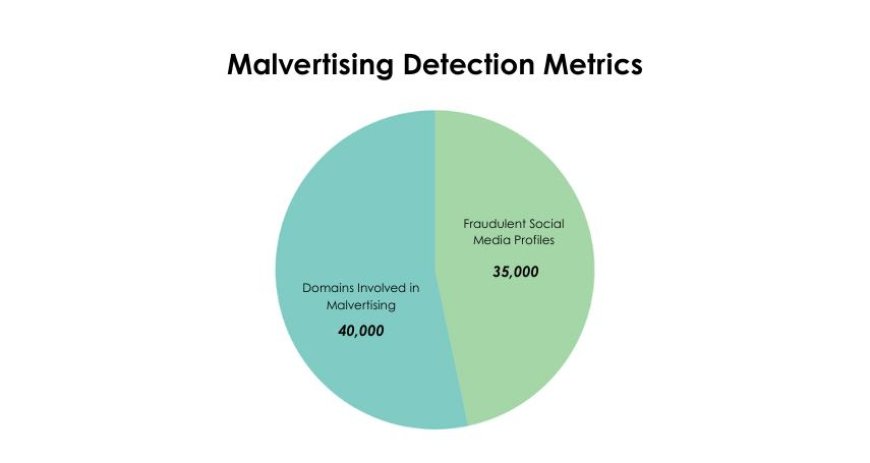
In fact, researchers detected approximately 800,000 malicious ads, many originating from over 35,000 fraudulent or hijacked social media profiles, with 40,000 domains actively participating in malvertising campaigns.
Bajaj Finance’s Digital Security Approach: Bajaj Finance Ltd. is a major financial company in India. It offers loans, insurance, and other services to millions of customers. With many online users, the company can be a target for cyber attacks.
The company has faced issues like fake messages, phishing, and malicious ads. These attacks can trick customers and put their data at risk.
To prevent this, Bajaj Finance uses smart cybersecurity systems to detect fraud. Employees and customers are trained on cybersecurity and online safety. Their websites and apps are secured to protect users.
What Is Malvertising
Malvertising is the practice of placing online ads that are designed to hack, steal, or mislead users instead of promoting products or services. These ads often appear on trusted websites and look completely normal, But in the backend, they run hidden code that can redirect people to fake websites, steal personal data, or install unwanted softwares.
In simple terms, Malvertising takes advantage of the trust people have in ads and websites. It affects both users and businesses in the following ways:
-
Users may unknowingly share data or download hidden files.
-
Businesses face the risk of losing customer trust if their ads or platforms are misused.
-
Attackers can scale quickly by spreading threats through popular ad networks.
Traits of Malvertising Ads
-
Imitates Ads
Malvertising ads replicate trusted ads’ design and tone to gain user confidence and bypass scrutiny. -
Fake Offers
They show seemingly genuine deals to entice clicks while intending to compromise user devices. -
Urgent Messages
These ads pressure users with urgent messages, prompting hasty interactions that attackers exploit. -
Clickbait Headlines
Headlines exaggerate or misrepresent content to attract attention, often masking malicious intent. -
Hidden Code
Ads may secretly install spyware or malicious programs that compromise system security. -
Steals Data
Malvertising can silently collect credentials, payment information, and other critical user details. -
Redirects Users
Clicks often lead to fake or compromised sites designed to steal information or infect devices. -
Pop-Up Traps
Sudden pop-ups aim to distract and manipulate users into interacting with suspicious content which leads to malicious attacks. -
Auto Downloads
Some ads download files without consent, silently introducing malware into systems. -
Suspicious Domains
They frequently use domains that are unfamiliar or flagged for security risks, signaling danger.
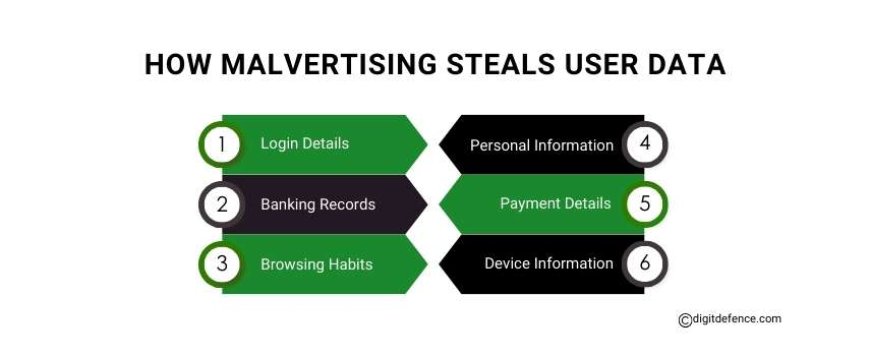
How Malvertising Steals User Data
-
Login Details
Malvertising can capture usernames and passwords when users enter them on infected pages or ads. -
Banking Records
Attackers may access bank account numbers or transaction information through malicious ad scripts. -
Browsing Habits
Ads track visited websites, search history, and online activity to profile users without consent. -
Personal Information
Names, addresses, phone numbers, and emails can be silently collected and misused for fraud. -
Payment Details
Credit card numbers and payment information entered online can be intercepted through malicious ads. -
Device Information
Attackers may gather device type, operating system, and IP addresses to exploit vulnerabilities further.
Why Malvertising Threats Target Popular Sites
-
High Traffic Reach: Attackers place Malvertising on well-known sites to reach thousands of users quickly.
-
Trusted Platforms: Users trust popular platforms, making them more likely to interact with ads unknowingly.
-
Premium Ad Networks: Even reputable ad networks, like Google Ads or AdSense, can be tricked into hosting malicious campaigns.
-
News Websites: High-traffic news sites such as BBC, CNN, and The New York Times are frequent targets.
-
Shopping Platforms: E-commerce giants like Amazon, eBay, and Walmart can host malvertising through compromised ad slots.
-
Entertainment Sites: Streaming and entertainment platforms, including YouTube, Hulu, and Spotify, are often exploited to reach large audiences.
-
Fast Spread of Threats: Popular sites allow attackers to scale campaigns quickly, infecting many users with minimal effort.
-
Increased Data Collection: By targeting trusted sites, attackers gather more sensitive user information, from logins to browsing habits.
-
Brand Hijacking Risks: When Malvertising appears on respected platforms, it damages user trust and can harm the brand hosting the ad.
Role of Cybersecurity in Malvertising
1. Firewall Protection
-
Firewalls monitor ad traffic, blocking suspicious requests that could affect users’ devices through Malvertising.
-
They filter scripts and redirects, stopping hidden code from hacking or collecting data on devices.
-
Firewalls act as the first barrier, preventing Malvertising from reaching networks or endpoints unnoticed.
2. Ad Scanner Impact
-
Ad scanners analyze scripts, links, and ad activity to detect Malvertising before it affects users.
-
They identify hidden redirects or codes that could collect information or redirect people online.
-
Scanners continuously update rules to track new Malvertising methods and stop potential hacks early.
3. AI Threat Detection
-
AI systems track unusual redirects, patterns, and clicks, flagging Malvertising before it affects users.
-
Machine learning analyzes behavior to spot ads trying to collect information or compromise devices.
-
AI speeds response, allowing teams to act quickly against ads that redirect or hack users.
4. Security Audit Role
-
Regular audits identify ad codes that could affect users or redirect them to unsafe locations.
-
Audits reveal platform weaknesses that hackers might exploit to collect personal data via ads.
-
Detailed reports guide updates and adjustments to reduce Malvertising effects on networks.
5. Data Protection Effect
-
Cybersecurity safeguards personal and financial data from being collected or compromised by Malvertising.
-
Encryption and access control prevent hidden ad code from redirecting users or accessing information.
-
Monitoring detects unusual data activity, helping stop Malvertising that affects sensitive user details.
6. Brand Reputation Role
-
Strong cybersecurity maintains user trust by reducing Malvertising’s effects on brand credibility.
-
Protecting ad platforms from hidden scripts prevents compromised content from affecting users’ experiences.
-
Security transparency reassures customers that their interactions and information are safely managed.
7. Proactive Risk Management
-
Integrated frameworks allow quick response when Malvertising attempts to redirect, hack, or collect data.
-
Threat intelligence identifies campaigns that might affect users, reducing the impact on networks.
-
Response plans let teams act efficiently, limiting Malvertising’s effects on operations or users.
Working with a trusted cybersecurity company makes sure these protections stay active and updated. Skilled teams help keep networks safe and running smoothly against Malvertising risks.
You may think malvertising only shows on less familiar websites, but it can also appear on trusted and popular sites. This is why using clear cybersecurity steps is important. It helps protect users, keep websites safe and secure.
Need protection from Malvertising threats? Contact our experts at [email protected] or call 7996969994 to secure your business.