Explain Different Kinds Of Online Threats
Do you believe that using the internet is safe? Find out the hidden dangers of phishing, ransomware, and more learn how to protect yourself from evolving online threats today!


Ever Wonder What Really Happens Behind That “Safe” Internet Connection?
Every time you go online - to shop, work, or just scroll - you’re stepping into a space filled with both opportunities and hidden dangers.
Cybercriminals don’t just target big companies anymore, they target anyone with valuable information - which means all of us.
From fake login pages that steal your passwords to silent malware that tracks your every click, online threats have become part of our daily lives.
The more connected we are, the more doors there are for hackers to enter.
That’s why it’s important to understand what these threats look like, how they work, and what you can do to protect yourself before it’s too late.
Colonial Pipeline Ransomware Attack (2021)
In 2021, the Colonial Pipeline, a major U.S. fuel supplier, was hit by a ransomware attack. Hackers encrypted critical data and demanded a ransom.
Attackers exploited a weak password to access systems and used ransomware to shut down operations. Colonial Pipeline worked with cybersecurity experts and law enforcement to respond.
The company ended up paying around ₹36.6 crore as ransom to regain access to its systems. This attack led to severe fuel shortages and widespread panic across the U.S. East Coast. It also served as a major wake-up call, showing just how important it is to have stronger cybersecurity measures in place for critical infrastructure.
What Are Online Threats?
Online threats are harmful activities that happen on the internet to attack people, businesses, or computer systems. These threats take advantage of weak passwords, outdated software, or small mistakes made by users. Their goal is to steal data, stop work, or get into systems without permission. Today, online attacks have grown from small scams to serious cybercrimes that can affect both big companies and everyday users.
Why Are Online Threats a Growing Concern?
-
Increased Digital Dependency:
With businesses and individuals depending heavily on technology, the attack surface for online threats has expanded significantly.
-
Sophistication of Attacks:
Cybercriminals are leveraging advanced tools and techniques, such as AI and machine learning, to execute more targeted and effective attacks.
-
Financial Impact:
The cost of cybercrime is expected to reach ₹10.5 lakh crore annually by 2025, according to Cybersecurity Ventures.
-
Data Sensitivity:
The growing importance of personal and financial data makes online threats more dangerous, as breaches can lead to identity theft, financial fraud, and reputational damage.
Different Kinds of Online Threats
1. Phishing Attacks
Phishing involves fraudulent attempts to steal sensitive information, such as usernames, passwords, or credit card details, by pretending to be a trustworthy entity.
-
How It Works: Cybercriminals send emails, messages, or links designed to trick users into revealing personal information.
-
Example: Fake bank emails asking users to "verify" their account details.
-
Protection Tips:
-
Avoid clicking on suspicious links.
-
Verify the sender’s identity.
-
Use email filtering tools.
2. Ransomware
Ransomware is a type of malicious software that locks users out of their data or systems until a ransom is paid.
-
How It Works: The attacker encrypts the victim’s files and demands payment in exchange for a decryption key.
-
Example: The 2017 WannaCry attack impacted over 200,000 systems worldwide.
-
Protection Tips:
-
Regularly back up data.
-
Keep software updated.
-
Use strong endpoint security solutions.
3. Malware
Malware encompasses a wide range of malicious software, including viruses, worms, spyware, and adware.
-
How It Works: Malware infiltrates systems to disrupt operations, steal information, or gain unauthorized access.
-
Example: Trojan horses disguised as legitimate software.
-
Protection Tips:
-
Install reputable antivirus software.
-
Avoid downloading files from untrusted sources.
-
Enable firewalls.
4. Data Breaches
A data breach occurs when unauthorized individuals access sensitive data, such as customer information, financial records, or intellectual property.
-
How It Works: Hackers exploit vulnerabilities in systems or networks to steal data.
-
Example: The 2021 Facebook data breach exposed the personal information of over 500 million users.
-
Protection Tips:
-
Implement strong encryption.
-
Conduct regular vulnerability assessments.
-
Use multi-factor authentication (MFA).
5. Distributed Denial of Service (DDoS) Attacks
DDoS attacks overwhelm a server or network with excessive traffic, rendering it inaccessible.
-
How It Works: Attackers use botnets to flood a system with requests, causing downtime.
-
Example: The 2016 Dyn attack disrupted major websites, including Twitter and Netflix.
-
Protection Tips:
-
Use DDoS mitigation tools.
-
Implement traffic monitoring systems.
-
Ensure scalable server capacity.
6. Social Engineering
Social engineering involves manipulating individuals into divulging confidential information.
-
How It Works: Attackers exploit human psychology, such as trust or fear, to deceive victims.
-
Example: A phone call from someone pretending to be tech support asking for account credentials.
-
Protection Tips:
-
Train employees on security awareness.
-
Verify identities before sharing information.
-
Limit access to sensitive data.
7. Identity Theft
Identity theft occurs when a cybercriminal uses someone’s personal information without permission, often for financial gain.
-
How It Works: Information is stolen via phishing, malware, or data breaches and used for fraudulent activities.
-
Example: Using stolen credit card details to make unauthorized purchases.
-
Protection Tips:
-
Monitor credit reports regularly.
-
Use identity theft protection services.
-
Avoid oversharing personal information online.
8. Man-in-the-Middle (MitM) Attacks
MitM attacks occur when a cybercriminal intercepts communication between two parties to steal data.
-
How It Works: Attackers position themselves between a user and a service, capturing sensitive information.
-
Example: Eavesdropping on Wi-Fi connections at public hotspots.
-
Protection Tips:
-
Avoid using public Wi-Fi for sensitive transactions.
-
Use VPNs to encrypt connections.
-
Enable HTTPS for secure web browsing.
9. Zero-Day Exploits
Zero-day exploits target software vulnerabilities before developers have patched them.
-
How It Works: Attackers use the window of opportunity before a patch is available to compromise systems.
-
Example: A recent zero-day vulnerability in a popular browser exploited user data.
-
Protection Tips:
-
Keep systems and applications updated.
-
Monitor for unusual activity.
-
Partner with cybersecurity firms for threat intelligence.
10. Cryptojacking
Cryptojacking involves the unauthorized use of a device’s computing power to mine cryptocurrency.
-
How It Works: Malware runs in the background, using resources to mine cryptocurrency.
-
Example: Websites running crypto-jacking scripts without user consent
-
Protection Tips:
-
Monitor CPU usage for unexplained spikes.
-
Use anti-malware tools.
-
Block suspicious domains.
The Impact of Online Threats
-
Financial Losses: Cyberattacks cost businesses billions annually in recovery expenses, fines, and lost revenue.
-
Reputational Damage: Breaches erode customer trust, leading to long-term brand damage.
-
Operational Disruptions: DDoS attacks and ransomware can bring business operations to a standstill.
-
Legal Consequences: Noncompliance with data protection regulations can result in hefty fines.
How to Protect Yourself from Online Threats
1. Adopt Strong Security Measures
-
Use firewalls, antivirus software, and encryption to secure systems and data.
2. Educate Employees and Users
-
Conduct regular training on identifying phishing attempts and other scams.
3. Regularly Update Systems
-
Patch software and hardware vulnerabilities to reduce exposure to threats.
4. Implement Strong Authentication Methods
-
Use multi-factor authentication to protect accounts.
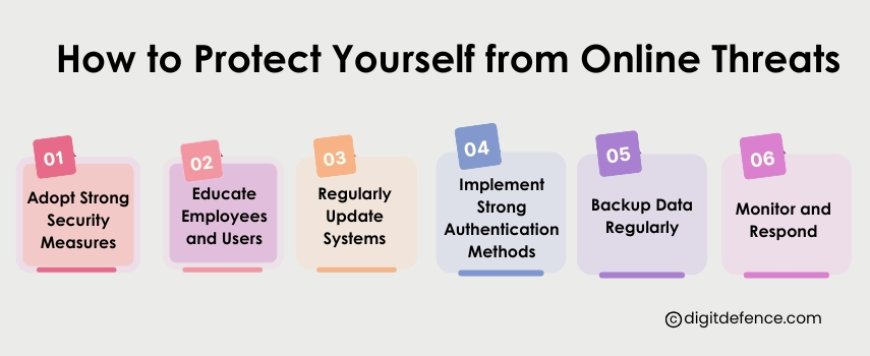
5. Backup Data Regularly
-
Follow the 3-2-1 backup rule: 3 copies of data, 2 different storage types, and 1 offsite backup.
6. Monitor and Respond
-
Use intrusion detection systems (IDS) and security information and event management (SIEM) tools to detect and respond to threats.
Future Trends in Online Threats
-
AI-Powered Attacks: Cybercriminals will increasingly use artificial intelligence to automate and enhance attacks.
-
Rise of Deepfake Scams: Advanced deepfake technology will make social engineering attacks more convincing.
-
Targeting IoT Devices: With the growth of smart devices, IoT security will become a critical focus.
-
Increased Cryptojacking: As cryptocurrency adoption rises, so will cryptojacking incidents.
The online world is changing fast, and so are the threats that come with it. To keep your data safe and protect your business, it’s important to understand what these online dangers look like.
Things like phishing emails, ransomware, and malware are becoming more common — and more harmful.
By learning about these threats, training your team, and following simple security habits, you can stay one step ahead.
In cybersecurity, being careful and prepared is always better than fixing a problem after it happens. Prevention truly is the best protection.