How to Stop Hackers from Tracking IP Address With Link?
Learn effective ways to prevent hackers from tracking your IP address through links using privacy tools, VPNs, and smart browsing habits.

Can Hackers Track Your IP Address Just by One Single Click?
Yes, it can happen to you. With one single click, whether on a meme, a fake login page, or a free offer, your IP address can be exposed to hackers. Although it may seem like just a number, to cybercriminals, it’s a gateway to your digital world.
So, how can you protect yourself from having your IP tracked by a single click?
It’s possible to stop your IP from being exposed through links with the right approach.
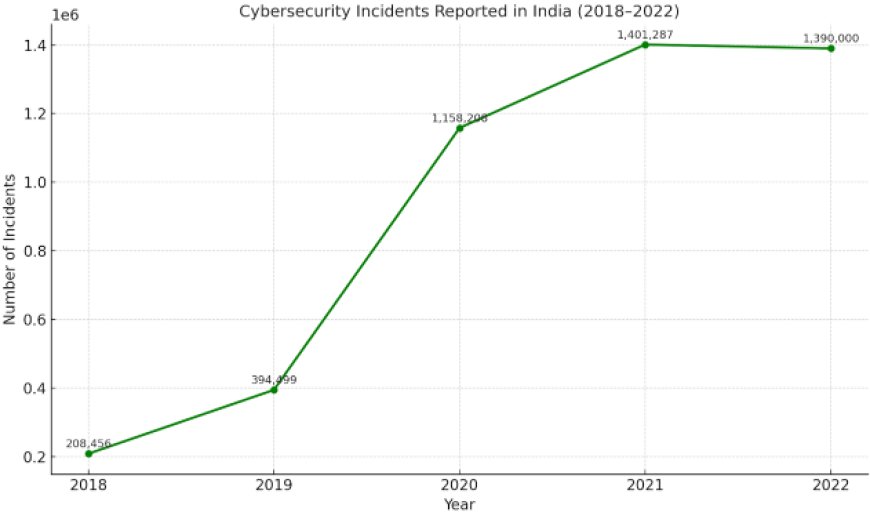
India saw over 13.9 lakh cybersecurity incidents reported in 2022, with many involving IP tracking, malware, and targeted phishing.
How Do Hackers Track an IP Address With a Link?
Here’s how it usually works:
-
They create a tracking link using free online tools
-
That link hides the actual destination
-
You click the link (maybe out of curiosity or by mistake)
-
Your IP address gets logged immediately
-
They now have access to your digital footprint
This tactic is common in social media DMs, phishing emails, and shady websites.
How to Stop Hackers from Tracking IP Address With Link
Protecting your IP address from being tracked through links doesn’t require expert skills—just consistent use of effective measures:

1. Use a VPN
A Virtual Private Network (VPN) conceals your actual IP address by routing your internet traffic through a secure server. When you click a link while connected to a VPN, only the VPN server’s IP is visible to others, not your real IP. This is the most reliable method to prevent IP tracking. Always choose a reputable VPN provider and avoid free services, as they may compromise your data privacy.
2. Use a Proxy Server
A proxy server acts as an intermediary between your device and the internet, masking your IP address. While it offers less security compared to a VPN, it still provides an additional layer of protection when browsing or clicking unfamiliar links.
3. Avoid Clicking Suspicious Links
Exercise caution by never clicking on links from unknown or untrusted sources, regardless of how urgent or appealing they appear. Common phishing traps include:
-
Fake job offers
-
Giveaways
-
Random online surveys
-
Links disguised as images or memes
A single click can expose your IP address and open the door to further security risks.
Recommended Tools for Network and IP Security
In addition to VPNs and proxies, consider using the following tools to enhance your protection:
-
Enable a Firewall
Most devices and routers come with built-in firewalls. Ensure yours is activated. Firewalls monitor incoming and outgoing traffic, blocking suspicious activity before it reaches your system. -
Maintain Active Antivirus Software
Effective antivirus software detects malware and harmful scripts. While it doesn’t mask your IP, it safeguards your devices from threats that may arrive through tracking links or malicious websites. -
Use Privacy-Focused Browsers
Browsers such as Brave, Firefox, and Tor offer features that block tracking scripts, fingerprinting, and intrusive ads, reducing the amount of data shared during your online sessions. -
Install Tracker-Blocking Extensions
Extensions like Privacy Badger and uBlock Origin prevent trackers from collecting your browsing data, adding an extra layer of privacy.
Public Wi-Fi Increases Your Risk of IP Tracking
Connecting to public Wi-Fi networks, such as those in cafes, hotels, or airports, can put your privacy and security at serious risk. These networks are often unsecured and unencrypted, making it easy for cybercriminals to monitor your online activity, track your IP address with links, and exploit your data.
The risk:
When your IP address is exposed on public Wi-Fi, hackers can intercept sensitive information, access your accounts, or launch targeted attacks against your devices.
How to protect yourself:
Always use a trusted VPN when connecting to public networks. A VPN encrypts your internet traffic, hides your IP address, and secures your data from prying eyes. This simple step greatly reduces the chance of data theft and prevents hackers from tracking IP address with link, keeping your online activity private no matter where you connect.
Stay safe and protect your business by never using public Wi-Fi without protection.
Consequences of Clicking Malicious or Tracking Links
Clicking on an untrusted link may seem harmless, but it can lead to serious security issues, including:
-
Exposure of your IP address and location
-
Unauthorized access to your email or accounts
-
Flooding of your device with spam or malware
-
Use of your personal identity in scams or fraud
To understand the risks, here are two real situations where attackers used links or IP tracking to access systems.
Unacademy Data Breach Through Exposed IPs:
Unacademy, a popular ed-tech platform, had over 22 million user accounts stolen and sold online.
Hackers found exposed IP addresses connected to Unacademy’s servers. By scanning these IPs, they discovered weak points and accessed user data, without needing passwords or phishing.
Paytm Phishing Attack Using Fake Job Links:
Scammers sent fake job offer links pretending to be from Paytm. When people clicked, attackers tracked their IP addresses and launched personalized scams like fake interviews, fake fees, and malware attacks.
Essential Steps to Protect Your IP Address
Use a Paid VPN
-
Hides your real IP address
-
Adds a strong layer of online privacy
Avoid Suspicious Links
-
Don’t click on unknown or shortened URLs
-
Always verify the source before opening
Enable Your Firewall
-
Blocks unauthorized access
-
Monitors incoming and outgoing traffic
Update Antivirus Software
-
Protects against malware that can reveal your IP
-
Ensures up-to-date security patches
Use a Privacy-Focused Browser
-
Limits tracking and data collection
-
Supports private browsing by default
Secure Public Wi-Fi Use
-
Avoid open networks when possible
-
If needed, connect only through a VPN
How Network Security Services Help Protect Your Business
If you manage a business or handle sensitive information, protecting your network is essential. Network security services offer expert protection that keeps your data safe, your operations running smoothly, and your reputation intact.
Here’s what they provide, and how it adds value to your business:
-
24/7 Threat Monitoring
Constant surveillance detects and responds to risks immediately, reducing downtime and preventing data loss.
-
IP Tracking and Detection
Identifies unusual access attempts, helping you stop cyber threats before they escalate.
-
Intrusion Prevention Systems (IPS)
Blocks hackers and unauthorized users automatically, safeguarding your critical systems and customer data.
-
Real-Time Alerts
Notifies you of suspicious activity instantly, allowing you to take quick action and avoid major disruptions.
These services reduce the risk of cyberattacks, protect your brand’s reputation, ensure compliance with data regulations, and give you peace of mind, all while allowing you to focus on running your business.
FAQs
Can someone track my IP just by clicking a link?
Yes. If the link is an IP logger, they can instantly collect your IP and location.
What’s the best way to hide my IP?
A VPN is the most reliable option to hide your real IP from anyone trying to track it.
How do I know if my IP is being tracked?
Watch for unusual ads, slow internet, or unfamiliar login notifications. These may be signs.
Can I change my IP address?
Yes. Restarting your router often assigns a new IP, or you can request a change from your internet provider. A VPN can give you a new one instantly.
Keeping your IP address safe is important to protect your privacy. A single click on a bad link can let hackers track you. Using a VPN, firewall, and safe browsers helps keep you secure. Always be careful with links and avoid public Wi-Fi without protection. Taking these steps can keep your information safe and stop hackers from tracking you.
Protect your network and stay safe from tracking IP addresses with a link to secure against cyber threats.
For expert help, contact us at [email protected].
Stay safe and secure!