Effective Ways to Prevent and Stop Botnet Attacks
Learn effective ways to prevent and stop botnet attacks with security practices, detection methods, and protection strategies for businesses.
Botnet attacks are one of the most common cyber threats businesses face today. A botnet is a network of compromised devices, computers, smartphones, or IoT systems, infected with malware and controlled remotely by cybercriminals. Once active, these “bots” can be used to launch large-scale attacks without the device owner even knowing.
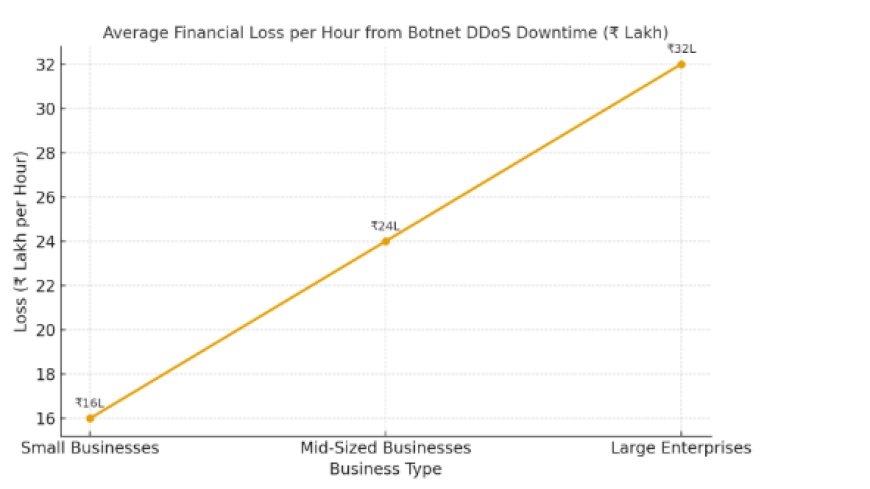
Recent studies show that botnets are responsible for nearly 30% of all cyberattacks worldwide, making them one of the most pressing threats businesses face today. The financial impact is equally alarming. On average, companies can lose between ₹16 lakh to ₹32 lakh per hour during botnet-driven DDoS downtime. For small and mid-sized companies, such losses can be extremely difficult to recover from.
In October 2016, Dyn, a major DNS provider, faced one of the largest DDoS attacks ever. The Mirai botnet hijacked thousands of IoT devices like cameras and routers with weak passwords, flooding Dyn’s servers. This caused outages for sites like Twitter, Netflix, and PayPal.
The attack disrupted online services across North America and Europe, making major websites unreachable. Businesses lost revenue, and traditional security tools struggled against a botnet of millions of IoT devices.
Dyn worked with cybersecurity teams and ISPs to filter traffic and restore services. The attack pushed IoT makers to fix default password issues, and many companies adopted stronger DDoS protection and monitoring systems.
What Is a Botnet?
To fight botnets, you must first understand them. What is a botnet? A botnet is a network of devices, computers, smartphones, and IoT gadgets infected with malware and controlled remotely by a hacker. Each device in this network is called a “bot” or “zombie.” In a simple botnet definition, it’s a collection of compromised devices (often called bot computer systems) working together under malicious control.
Hackers use botnets to:
-
Launch Distributed Denial of Service (DDoS) attacks
-
Steal sensitive data like passwords and financial details
-
Send spam emails on a massive scale
-
Spread additional malware
Botnets often spread silently. Users rarely notice their devices are part of one until the damage is already done. This makes the botnet virus particularly dangerous, as it can operate in the background for weeks or months without detection.
Types of Botnet Attacks Companies Face

When learning what a botnet is, it’s important to understand the different ways these attacks can harm businesses. Cybercriminals don’t always use botnets the same way; they adapt them for multiple malicious activities. These types of botnet attacks include:
Distributed Denial of Service (DDoS) Attacks
-
A botnet floods a company’s servers with fake traffic until the system crashes.
-
This can take down websites, apps, and even financial systems.
Spam and Phishing Campaigns
-
Hackers use botnets to send millions of spam emails or fake messages.
-
These often include phishing links designed to steal passwords, credit card data, or company credentials.
Data Theft and Keylogging
-
Botnets can secretly record keystrokes or extract sensitive files from employee devices.
-
Stolen data may include login credentials, customer information, or financial records.
Click Fraud
-
In industries with PPC advertisers, botnets are used to generate fake ad clicks.
-
This wastes ad budgets and gives misleading campaign performance metrics.
Cryptojacking
-
Some botnets hijack company computers to secretly mine cryptocurrency.
-
This slows down systems, increases electricity bills, and impacts business productivity.
How to Detect If Your Device Is Part of a Botnet
After knowing what a botnet is, the next step is learning how to spot if your device is secretly being controlled by one. Many companies don’t realize their systems are infected until serious damage is done. Here are the common signs:
-
Slow Performance
If computers or servers suddenly become unusually slow, it may be because a botnet virus is using resources in the background.
-
Unexplained Network Traffic
Botnets constantly communicate with their “command and control” servers.
If you notice large amounts of outgoing traffic at odd times, it’s a red flag.
-
Frequent Crashes or Freezes
Infected systems often become unstable and may shut down or restart without reason.
-
Unusual Emails or Messages Sent from Accounts
If your company’s email accounts are sending spam without employees knowing, it’s a clear sign of botnet activity.
-
Firewall or Security Alerts
Security tools may flag repeated suspicious connections or attempts to access unknown servers.
-
High CPU Usage Without Reason
If devices are heating up, making loud fan noises, or showing high processor usage even when idle, they may be hijacked for cryptomining or DDoS activity.
Effective Ways to Prevent and Stop Botnet Attacks
Now that you know what a botnet is and how it harms businesses, let’s explore how to protect against it.
-
Strengthen Endpoint Security
Devices like laptops, smartphones, and IoT gadgets are often the entry points for botnets. Utilize advanced endpoint protection tools that can detect malware early and prevent infections from spreading.
-
Regular Software Updates
Most botnets exploit old security flaws. Keeping your operating systems, firewalls, and applications updated reduces the chance of your system being hijacked by a botnet virus.
-
Implement Network Monitoring
Botnets rely on unusual traffic patterns. With continuous monitoring, companies can detect and block suspicious activity before it becomes a large-scale attack.
-
Secure IoT Devices
The Mirai botnet proved how dangerous unsecured IoT devices can be. Change default passwords, disable unnecessary features, and update firmware regularly.
-
Employee Training
Many botnets spread through phishing emails. Training staff to recognize suspicious links and attachments reduces the risk of infection.
-
Use Firewalls and Intrusion Detection Systems
Firewalls block unauthorized access, while intrusion detection systems can identify abnormal behavior linked to types of botnet communication.
-
Multi-Factor Authentication (MFA)
Even if login credentials are stolen, Multi-Factor Authentication (MFA) adds another layer of protection, making it harder for hackers to use infected accounts.
-
Work with Cybersecurity Experts
Companies that lack in-house expertise should partner with cybersecurity firms. They provide advanced botnet detection tools and response strategies.
The Future of Botnet Threats
Understanding what is a botnet is is not enough; companies must also prepare for how these threats are evolving. Botnets are no longer simple networks of infected computers. They are becoming smarter, faster, and harder to detect.
-
AI-Powered Botnets
Future botnets may use Artificial Intelligence (AI) to avoid detection and change their behavior in real time. This makes them more adaptive and dangerous for businesses.
-
IoT Devices as Easy Targets
With billions of Internet of Things (IoT) devices like smart cameras, routers, and sensors coming online, hackers are likely to target them more. These devices often lack strong security, making them perfect for building large bot computer networks.
-
Cloud Botnets
As companies shift to cloud services, hackers are finding ways to build botnets in cloud environments. This could lead to large-scale attacks with huge computing power.
-
More Attacks on Businesses
Botnets will increasingly target businesses for ransomware, data theft, and DDoS attacks.
Companies that rely on online services, like e-commerce or financial firms, are especially at risk.
Botnets are silent but powerful cyber threats. Understanding what a botnet is, the botnet definition, and the various types of botnet attacks is the first step. Businesses must take preventive action through strong endpoint security, employee training, IoT protection, and expert guidance.
Cybercrime will only grow, but companies that stay proactive can reduce risks and protect their digital assets.
Take the first step towards stronger protection, reach out to our experts today at [email protected], and keep your business safe from botnet attacks.