Best AI Phishing Detection Tools for Businesses
Learn how AI phishing detection tools help businesses protect emails, links, and data. Includes threat detection, cybersecurity, employee training, and risk prevention.

Every day, businesses receive hundreds of emails from clients, suppliers, and even strangers. Most of these emails are safe, but some are not. Hidden among them are phishing emails, fake messages that look real but are made to steal your passwords, money, or data.
Today’s phishing attacks are not easy to spot. Hackers use real company logos, official words, and fake websites that look almost the same as the original ones. Even smart and careful people can fall for them. One wrong click can give hackers access to company accounts, private data, and even bank information.
That’s why AI-powered phishing detection tools are becoming essential for every business. These tools use artificial intelligence to detect suspicious emails, links, or attachments before anyone opens them. Unlike normal spam filters, AI tools learn from patterns, they study how emails are written, where they come from, and what kind of links they contain. When something looks unusual, the tool immediately flags it or blocks it.
AI Phishing Detection at a FinTech Platform
VerifiedX is a fast-growing financial technology company. Because they handle lots of customer money and sensitive financial data, they faced constant threats from phishing attacks. These attacks were getting more advanced, very believable emails, realistic links, and even impersonation
Phishing attempts were often highly customized and used advanced techniques, making them difficult to detect. This put the company at risk of financial loss and potential damage to its reputation. Traditional email systems struggled to filter out subtle phishing links, especially those that looked genuine, such as fake login pages or cloned websites
The company implemented an AI-powered phishing detection system that analyzed email content, links, and sender behavior in real time. It flagged unusual activity, blocked suspicious messages, and continuously learned from new threats and employee feedback to stay ahead of phishing attacks.
How AI Phishing Detection Tools Work
Traditional phishing filters depend on blacklists and preset rules. But attackers constantly change domain names, links, and language, making old filters useless. That’s where artificial intelligence (AI) steps in.
AI tools use machine learning and natural language processing (NLP) to study thousands of email behaviors and detect threats that humans might miss.
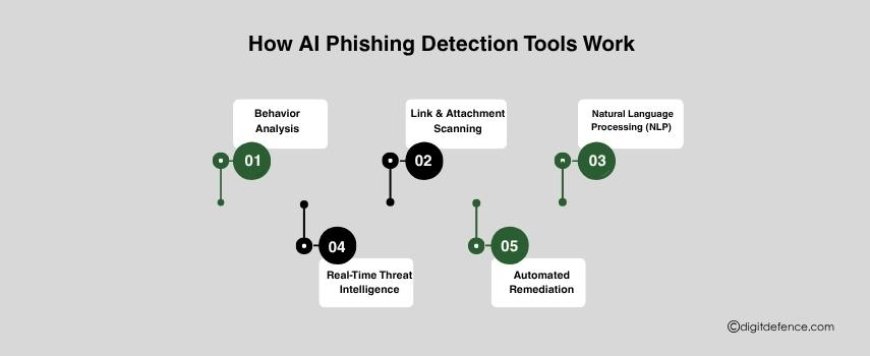
Here’s how they work step by step:
-
Behavior Analysis – AI observes normal communication patterns inside your organization, who sends emails, at what time, and what tone or content they use. When something looks unusual, say, a fake “CEO request” email or an unexpected invoice, the AI immediately flags it.
-
Link & Attachment Scanning – These tools don’t just check for known bad links. They analyze shortened URLs, redirections, and domain reputations in real time. If a file or link behaves suspiciously, it’s sandboxed (tested safely in isolation) before delivery.
-
Natural Language Processing (NLP) – AI understands human language. It looks for emotional triggers like urgency (“Your account will be locked!”) or reward-based tricks (“Claim your refund now”), often used in phishing attempts.
-
Real-Time Threat Intelligence – AI systems stay updated with global phishing databases. They can identify patterns from new threats worldwide within minutes.
-
Automated Remediation – Some advanced tools can remove malicious emails from all inboxes instantly and alert security teams.
Key Features to Look for in AI Phishing Detection Tools
When choosing a tool, focus on features that provide complete protection and smooth integration with your workflow:
|
Feature |
Description |
|
Behavior-based AI detection |
Learns normal communication and spots anomalies automatically. |
|
URL & Attachment sandboxing |
Opens and analyzes links/files safely in a virtual environment. |
|
NLP-based email analysis |
Reads tone, intent, and structure to spot phishing language. |
|
Integration with email systems |
Must work seamlessly with Google Workspace, Microsoft 365, etc. |
|
Automated quarantine & alerts |
Suspicious emails are flagged or removed instantly. |
|
Dashboard & reporting |
Gives admins visibility into threats and user actions. |
|
User awareness tools |
Provides alerts or banners that educate employees. |
|
Scalable pricing |
Flexible for small and large businesses alike. |
Top AI Phishing Detection Tools for Businesses
Here are some of the most effective types of AI tools that businesses can use to prevent phishing attacks:
1. AI-Powered Email Scanners
These tools automatically scan all incoming and outgoing emails for suspicious patterns. They analyze sender reputation, unusual language tone, and hidden links that may lead to fake websites. AI-based scanners can detect spoofed domains and alert users before any damage occurs.
2. Natural Language Processing (NLP) Filters
These filters use NLP, a part of AI that understands human language, to identify messages that sound deceptive. Unlike traditional filters that rely only on keywords, NLP-based systems can understand intent and context, making them powerful against social engineering attacks.
3. Behavioral Analysis Tools
Behavioral AI tools monitor user activity and email patterns across an organization. They learn what “normal” behavior looks like and quickly flag anything unusual, like login attempts from a new device or an unexpected data transfer.
4. URL and Link Analysis Engines
AI-driven link analysis engines scan every link before a user clicks it. These tools inspect domain names, SSL certificates, redirect paths, and even visual similarities between fake and real websites.
5. Attachment Sandboxing Tools
Malicious attachments are one of the most common ways phishing emails infect systems. Sandboxing tools open these attachments in a secure, isolated environment to observe their behavior before allowing access.
6. Threat Intelligence Platforms
These tools gather global phishing data, analyze it using AI, and provide real-time updates on emerging threats. Businesses can integrate these insights into their email or network systems to stay ahead of new attack techniques.
How AI Enhances Phishing Detection
AI doesn’t just identify threats, it continuously learns and changes. Unlike rule-based filters, AI adapts to new phishing techniques daily.
Here’s how AI gives businesses a stronger defense:
-
Speed: Detects and blocks phishing attempts in seconds.
-
Accuracy: Reduces false positives by analyzing context, not just keywords.
-
Adaptability: Learns from each attack and updates defenses automatically.
-
Scalability: Works across thousands of users with minimal manual effort.
-
Proactive defense: Identifies suspicious behavior even before an attack happens.
AI’s predictive capability is what makes it essential. Instead of reacting after a breach, AI allows businesses to prevent attacks in real time.
Implementing AI Phishing Detection in Your Business
To get the best results from these tools, follow these steps:
-
Start with an audit – Understand your current email security setup.
-
Choose an AI tool that fits – Look for one compatible with your existing platforms.
-
Pilot test the system – Deploy it for a small group first and fine-tune alerts.
-
Train your employees – Even the best AI works better when staff recognize phishing patterns.
-
Monitor and adapt – Review monthly reports, check flagged emails, and update policies.
Phishing remains one of the most common and costly cyber threats today. Attackers are smarter, messages look real, and simple spam filters are no longer enough.
That’s why businesses are turning to AI phishing detection tools, powerful systems that learn, adapt, and stop threats before they reach inboxes.
You can protect your organization from phishing and keep your data and reputation safe by buying the correct technology, training your team, and remaining alert.