What Is CTEM and How It Protects Your Business
Learn how CTEM (Continuous Threat Exposure Management) protects businesses from cyber threats with real-time monitoring and risk prioritization.

Don’t Wait for a Cyber Attack to Hit Your Business
Many businesses use security tools but still miss risks in their systems. Problems are often missed because checks are done only sometimes, and not all risks are looked at. CTEM (Continuous Threat Exposure Management) helps you see all your devices and apps, find hidden risks, and focus on the problems that matter most. Watch your systems, act on alerts fast, and stop hackers before they cause damage.
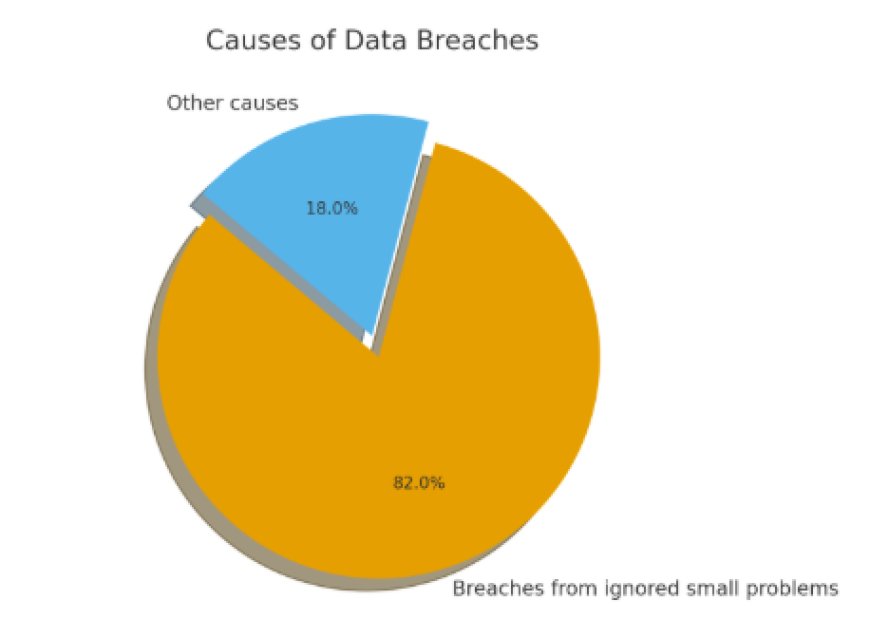
More than 8 out of 10 data breaches happen because small problems were ignored, showing why checking and fixing risks all the time is important.
Oman Arab Bank, a leading financial institution in the Middle East, wanted to strengthen its cybersecurity to protect sensitive financial data and meet strict compliance requirements. Traditional security methods were not enough to cover all digital assets and respond quickly to threats.
The bank faced multiple challenges. First, they needed complete visibility across all systems, cloud applications, and remote devices, which was difficult with periodic security checks. Second, prioritizing which vulnerabilities posed the most risk was a constant problem, as too many alerts made it hard to focus on the most critical issues.
The bank faced multiple challenges. First, they needed complete visibility across all systems, cloud applications, and remote devices, which was difficult with periodic security checks. Second, prioritizing which vulnerabilities posed the most risk was a constant problem, as too many alerts made it hard to focus on the most critical issues.
What Is CTEM?
CTEM (Continuous Threat Exposure Management) is a security method that keeps watching your business systems all the time. It helps by finding, checking, and ranking security problems in your digital setup.
Unlike old security checks, which run only once in a while, CTEM works in a nonstop cycle. This makes it more active and ready to deal with real threats as they happen.
You can think of CTEM as a daily health check for your IT systems. Instead of waiting for a yearly check-up, it keeps watching every day, spotting risks early and stopping them before they grow into serious problems.
Core Components of CTEM
CTEM works step by step to keep your business safe from online threats. Each part has a special job to make sure risks are found and fixed on time.
1. Discovery
In this step, CTEM looks for all the digital assets your business has. This includes computers, servers, cloud accounts, apps, and even devices you may have forgotten about. Sometimes, companies have hidden or unmanaged systems (called shadow IT) that they don’t track. Hackers love to target these weak spots, so finding them first is very important.
2. Validation
After finding possible risks, CTEM checks if hackers can really use them to attack. Not every weakness is dangerous. For example, a system may show a warning, but it might not be possible for an attacker to break in. CTEM helps filter out the false alarms and shows you the real threats that could cause harm.
3. Prioritization
Most companies get long lists of problems, but don’t know which to fix first. CTEM solves this by ranking the risks. It tells you which issues are most urgent and could hurt your business the most, like a weak login system or an open security hole in a server. This saves time and makes sure the biggest dangers are handled first.
4. Remediation Guidance
Finding problems is not enough, you also need to fix them. CTEM gives clear steps your team can follow to solve or reduce each risk. For example, it might suggest updating old software, changing weak passwords, or shutting down unused accounts. This makes fixing faster and easier.
5. Continuous Monitoring
Cyber threats change daily, and new risks appear all the time. That’s why CTEM keeps working nonstop instead of waiting for monthly or yearly scans. If a new problem shows up, CTEM will catch it quickly and alert your team, helping you stay one step ahead of hackers.
How CTEM Protects Your Business
CTEM is not just a tool, it is a system that helps your business stay safe from cyber risks. Here’s how it protects you in simple steps:
1. Clear View of All Your Assets
CTEM finds every device, app, and account connected to your business, whether they are on your office network, in the cloud, or used by remote workers. Many companies don’t even know all the systems they have, which gives hackers an easy way in. CTEM makes sure nothing is hidden.
2. Focus on Real Threats
Instead of giving you a long list of every small issue, CTEM checks which risks hackers can really use to attack. This way, your security team knows which problems to fix first, saving time and effort.
3. Fix the Most Important Problems First
Some risks are small and don’t really hurt the business, while others can cause big damage. CTEM sorts these issues and shows you the most serious ones. This helps your team focus on what really matters.
4. Always-On Protection
Unlike old methods that only check once in a while, CTEM works nonstop. If a new risk shows up today, it will be found and reported right away. This means no waiting months to find out about dangers.
5. Helps with Rules and Builds Trust
Most businesses need to follow security rules like ISO 27001, NIST, or GDPR Security. CTEM supports these rules and shows customers that their data is safe. When people know you protect their information, they trust your business more.
CTEM vs Traditional Vulnerability Management
|
Traditional Vulnerability Management |
CTEM (Continuous Threat Exposure Management) |
|
Runs only at fixed times (weekly, monthly, quarterly) |
Works nonstop in real time |
|
Checks only known problems |
Finds all risks, even hidden ones |
|
Sorts by technical score only |
Sorts by real business impact and risk |
|
Focuses on passing compliance checks |
Focuses on reducing real threats and staying strong |
|
Alerts come late, after scheduled scans |
Alerts come right away, anytime |
|
Limited to scan reports |
Adapts to new and changing threats |
|
Helps meet compliance needs |
Builds trust, lowers risk, and saves money |
Step-by-Step Guide to Using CTEM
Using CTEM doesn’t have to be complicated. Here are clear steps that any business can follow to stay safe from cyber risks:
1. Assess Your Current Security Posture
Start by checking what tools, systems, and processes you already have. This helps you understand where your weak spots are.
2. Build a Complete Asset Inventory
List all devices, apps, and accounts connected to your network, including hidden or unused ones. Hackers often target these overlooked systems.
3. Choose the Right CTEM Platform
Pick a CTEM solution that can find risks, test them, rank them, and provide continuous monitoring.
4. Integrate CTEM with Security Tools
Make sure CTEM works with firewalls, Security Information and Event Management, XDR, and other security systems for better protection.
5. Set Risk Priorities Based on Business Impact
Not all risks are equally dangerous. Focus first on the ones that could hurt your business the most.
6. Follow Clear Remediation Guidance
Use the fix instructions from CTEM to solve problems step by step, such as updating systems or closing weak points.
Protect Your Business with Continuous Cybersecurity
Keeping your business safe from cyber attacks works best when risks are tracked, prioritized, and acted on quickly. A good CTEM system helps companies find hidden threats, focus on real risks, and fix problems before they cause damage. Small steps, regular monitoring, and quick responses make your security stronger over time and keep your data, systems, and customers safe.