How to Handle Security Challenges in SaaS Applications?
Learn effective strategies to address common security challenges in SaaS applications, including access control, data privacy, and compliance.
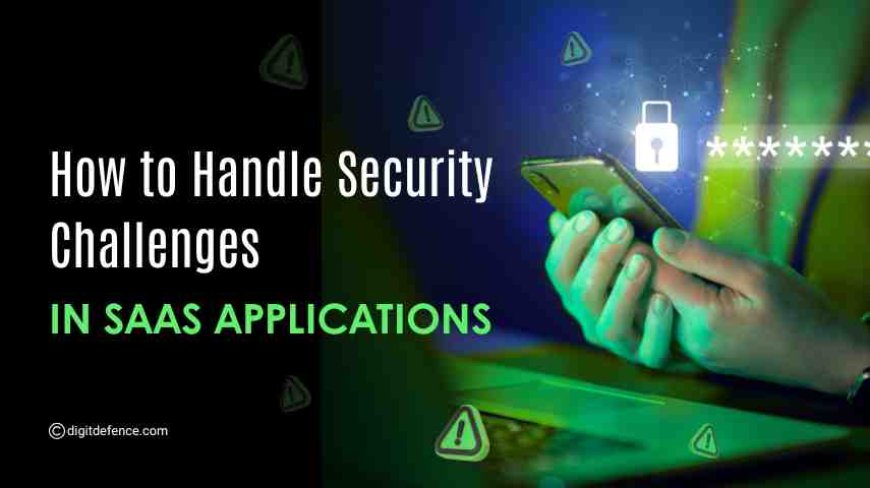
SaaS applications have become foundational across departments, from operations and finance to customer service and analytics. While their convenience and scalability support growth, their rapid adoption has introduced a complex set of security risks that many organizations underestimate.
Most businesses assume their SaaS vendors handle all security. However, SaaS follows a shared responsibility model; providers secure the platform, but customers are responsible for access control, data management, misconfigurations, and third-party integrations.
If these responsibilities aren't handled well, it can lead to serious problems like breaking rules, leaking customer data, systems not working, and loss of money.
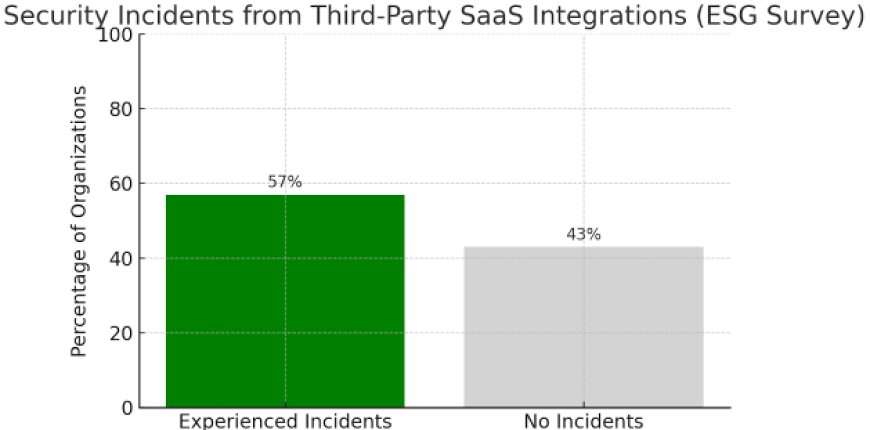
57% of organizations have experienced security incidents directly linked to third-party SaaS integrations, according to an ESG survey.
What Is a SaaS Application?
A SaaS (Software as a Service) application is a cloud-based software that users access through the internet, usually via a web browser, without needing to install or maintain it on their own devices. The software is hosted and managed by a third-party provider, who handles updates, security, and infrastructure.
Common examples include tools like Google Workspace, Salesforce, Zoom, and Microsoft 365. These applications are widely used for business operations such as communication, customer management, accounting, and collaboration.
SaaS applications are popular because they are easy to access, scale with your needs, and reduce the burden of in-house IT management.
Common Security Risks in SaaS Applications
SaaS applications are widely used in today’s businesses. However, their increasing use brings several security risks. Below are the most common technical risks based on standards like NIST SP 800-53, CSA Cloud Controls Matrix, and OWASP.
-
Improper Access Control
Many SaaS platforms give users broad access by default. Without strict controls to limit permissions, users may have access to sensitive data or systems beyond what they need. This can lead to unauthorized access and data breaches.
-
Insecure APIs
APIs allow SaaS tools to connect and share data. If these APIs are not secured properly, they become targets for attacks. Common problems include open access points, exposing too much data, and not validating inputs, which can lead to unauthorized access.
-
Weak Authentication and Identity Management
SaaS systems without strong login controls, like Single Sign-On (SSO), Multi-Factor Authentication (MFA), or adaptive login policies, are at higher risk of unauthorized account access. Effective identity management reduces the chances of stolen credentials being misused.
-
Insufficient Data Encryption
Data sent or stored without proper encryption is vulnerable to interception or theft. SaaS providers must use strong encryption methods for data both in transit and at rest. Where possible, customers should manage their own encryption keys.
-
Outdated or Vulnerable Dependencies
SaaS platforms often use open-source software and third-party components. If these are not kept up to date, they may contain known security flaws. Attackers can exploit these vulnerabilities, especially through software supply chain attacks.
-
Inadequate Logging and Monitoring
Without detailed logs and real-time monitoring, detecting and responding to security incidents is difficult. Logs should track access attempts, changes in settings, data exports, and integration activities. Alerts should be connected to security monitoring tools like SIEM or SOC for quick action.
To understand the risks in SaaS, here’s the real incident
Deloitte, a global professional services firm, hosted internal communications and client data on a cloud-based SaaS platform. One administrator account lacked multi-factor authentication, creating a critical entry point.
An attacker exploited this gap and gained access to the internal email system, exposing sensitive client information, project details, and credentials through unauthorized access to privileged accounts.
Deloitte responded by securing the affected systems, enforcing MFA on all admin accounts, and enhancing their SaaS access controls. They also implemented continuous monitoring and updated incident response protocols.
Key Components of a Strong SaaS Security Framework
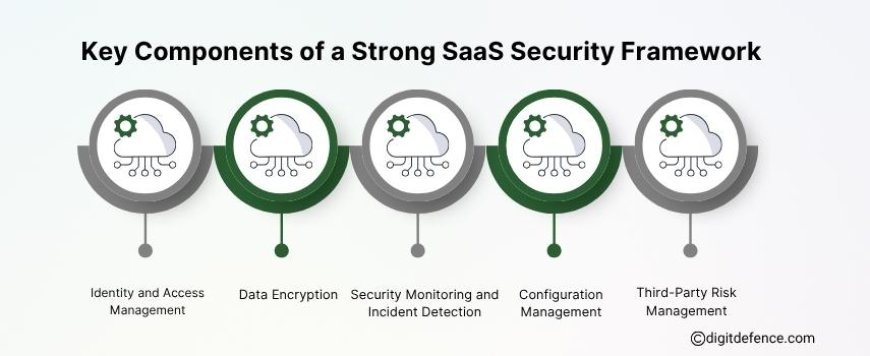
1. Identity and Access Management (IAM)
Implement centralized identity services using SSO and enforce Multi-Factor Authentication MFA across all user accounts. Apply Role-Based Access Control (RBAC) and enforce least-privilege principles to restrict access based on job functions.
Compliance Tip: Maintain a documented process for provisioning, access modification, and deprovisioning, ensuring access reviews are auditable and aligned with regulatory requirements.
2. Data Encryption
Encrypt all data in transit using protocols such as TLS 1.2 or higher, and encrypt data at rest with AES-256 or equivalent. Support for customer-managed keys and regional encryption controls should be prioritized.
Compliance Tip: Validate that encryption practices meet the data protection obligations of applicable frameworks such as GDPR, HIPAA, or PCI DSS.
3. Security Monitoring and Incident Detection
Route SaaS activity logs to a centralized SIEM for real-time monitoring, anomaly detection, and incident investigation. Track key events such as access attempts, permission changes, and data exports.
Compliance Tip: Retain logs according to regulatory timelines and ensure they are tamper-proof and searchable for audit purposes.
4. Configuration Management
Audit SaaS configurations regularly to enforce secure defaults and prevent misconfigurations. Apply controls based on CIS Benchmarks or vendor hardening guides, and monitor for drift over time.
Compliance Tip: Maintain version-controlled configuration baselines and change documentation to support technical control verification during audits.
5. Third-Party Risk Management
Evaluate all third-party integrations and APIs for security posture, access scopes, and compliance certifications. Review vendor security documentation and audit reports before deployment.
Compliance Tip: Maintain an approved vendor register and perform periodic risk assessments to demonstrate ongoing oversight of third-party access and data handling.
AWS’s Role in SaaS: 5 Key Contributions
AWS leads in cloud security, which supports SaaS by offering secure, scalable infrastructure and tools that simplify deployment and management.
-
Scalable Infrastructure
AWS, which provides on-demand compute (EC2, Lambda), storage (S3), and networking (VPC) to support fast and elastic SaaS deployment across global regions.
-
Secure Multi-Tenant Architecture
IAM and resource isolation ensure strong data separation and tenant control.
-
Built-in Security and Compliance
Services like KMS and CloudTrail help meet standards like SOC 2 and GDPR.
-
Identity and Access Management
Amazon Cognito and IAM integrate to secure your business with network authentication and authorization.
-
Monitoring, Billing, and Automation
Supports usage tracking, CI/CD, and billing through AWS Marketplace and APIs.
Measuring the Effectiveness of Your SaaS Controls
-
Monitor access review completion rates.
-
Track detected misconfigurations.
-
Measure incident response times.
-
Ensure comprehensive audit log coverage.
-
Review metrics regularly to identify security gaps.
-
Align security efforts with business goals.
FAQs
1. What are the security issues with SaaS?
SaaS security issues include misconfigured access controls, weak authentication, unsecured APIs, a lack of data encryption, and insufficient monitoring. These risks can lead to data breaches, compliance failures, and unauthorized access if not properly managed.
2. What are the biggest threats to SaaS environments?
The biggest threats to SaaS include unauthorized access, credential compromise, misconfigured settings, third-party integration flaws, and data leakage through unsanctioned usage (Shadow IT).
3. Which security measure is crucial in SaaS applications?
Multi-Factor Authentication (MFA) is one of the most crucial security measures in SaaS applications. It significantly reduces the risk of unauthorized access by requiring multiple forms of user verification.
4. How to ensure your SaaS application is secure?
To secure a SaaS application, implement strong IAM policies, enforce encryption, monitor user activity, perform regular security audits, and validate third-party integrations. Align controls with standards like SOC 2, ISO 27001, or GDPR.
5. How to assess SaaS security?
Assess SaaS security by evaluating configuration settings, access controls, encryption status, API exposure, and compliance alignment. Use SaaS Security Posture Management (SSPM) tools and perform periodic risk assessments.
SaaS makes business easier, but security needs careful attention. With the right steps, you can stay safe, compliant, and focused on growth.
For expert guidance, reach out to us at [email protected].