How Virus Ransomware Enters Your Network Security
Learn how virus ransomware infiltrates your network, the common entry points, and how to recognize and reduce associated security risks.

Could One Click put your entire business at risk?
What if one email, one careless click, or one missed software update could shut down your entire business? That’s how easy it is for a virus or ransomware to get in. It doesn’t wait; it enters your system quietly and locks everything behind a digital wall. And once it's in, the damage is fast and deep.
Ransomware can stop your operations, leak your data, and cost you money. Worse, most businesses don’t realize they’ve been attacked until it’s too late. Knowing how this threat enters your system is the first step in protecting your business.
Studies suggest that over 70% of ransomware attacks start with phishing emails, making human error one of the biggest vulnerabilities in any system.
Cognizant is a leading global IT services company that supports enterprises with their digital operations and infrastructure. In one significant incident, the company’s internal network was compromised by a type of ransomware. Once inside, the malware spread across systems, encrypting critical files and disrupting business operations. This breach impacted the company’s ability to serve its clients efficiently and created internal operational challenges.
After the attack, Cognizant worked with experts to remove the ransomware and secure their systems. They made their security stronger, kept clients informed, and took steps to prevent this from happening again. This incident shows that ransomware can be a big threat, even to companies with strong IT teams.
What Is Ransomware?
Ransomware is a form of malicious software designed to restrict access to a computer system or encrypt critical files, rendering them unusable until a ransom is paid. Typically, attackers demand payment in cryptocurrency to maintain anonymity. Importantly, even after payment, there is no assurance that the data will be restored.
This threat impacts organizations across all sectors, including businesses of various sizes, educational institutions, healthcare facilities, and small enterprises. The widespread nature of ransomware means that virtually any entity connected to a network can become a target.
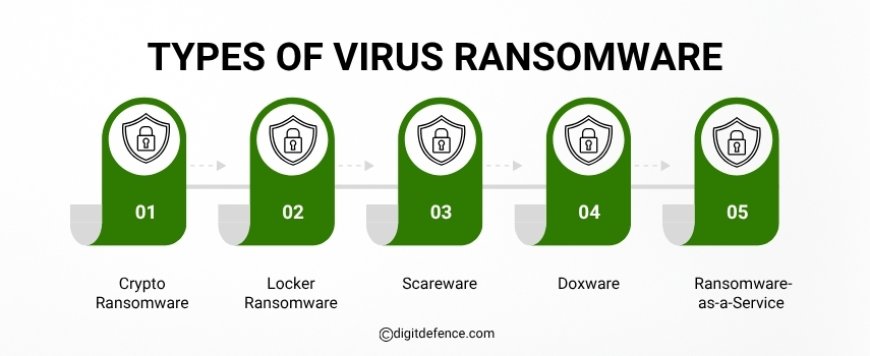
Types of Virus Ransomware
-
Crypto Ransomware
-
Encrypts critical files on the infected system.
-
Requires payment in exchange for a decryption key.
-
Locker Ransomware
-
Restricts access to the entire device, not just files.
-
Prevents users from accessing any system functions until the ransom is paid.
-
Scareware
-
Generates false alerts about system infections or threats.
-
Attempts to coerce users into purchasing unnecessary or fraudulent software.
-
Doxware
-
Threatens to publicly expose confidential personal or business information.
-
Demands payment to prevent the release of sensitive data.
-
Ransomware-as-a-Service (RaaS)
-
Provides ransomware tools for rent or sale to other criminals.
-
Lowers technical barriers, allowing less skilled attackers to execute ransomware campaigns.
How Does Virus Ransomware Enter Your System?
1. Phishing Emails
This is one of the most common entry points. Hackers send emails that appear to be from trusted sources, like your bank, a known vendor, or even a coworker. These emails usually contain links or attachments designed to install ransomware when clicked. One wrong click can silently give attackers access to your system.
2. Malicious Pop-Ups and Advertisements
You might see fake warnings or alerts while browsing the web, urging you to install updates or an antivirus. These pop-ups often come from unsafe or compromised websites. When clicked, they can automatically download ransomware onto your device without any further action from you.
3. Vulnerable Remote Desktop Protocol (RDP)
Remote Desktop Protocol (RDP) allows users to connect to computers remotely. If RDP ports, like port 3389, are left open or use weak passwords, hackers can force their way in. Once they gain access, they can move around the system freely and deploy ransomware across the network.
4. Drive-By Downloads
Sometimes, ransomware doesn’t need you to click anything. Just visiting a compromised or fake website is enough for the malicious code to download itself in the background. These types of attacks are especially dangerous because they often go unnoticed until the damage is done.
What Happens After a Virus Ransomware Breach?
|
Risk Factor |
Effect |
|
Financial Burden |
Ransoms plus recovery expenses and lost revenue |
|
Data Loss |
Incomplete or missing backups can be permanent |
|
Reputational Hit |
Compromised data leads to a loss of trust. |
|
Legal Exposure |
Regulatory fines may apply after breaches |
|
Operational Halt |
Systems shut down until recovery completes |
How to Prevent Ransomware?
1. Regular Software Updates
Keep your operating systems, browsers, and applications updated. Patching known security flaws reduces the risk of hackers using them to inject ransomware.
2. Staff Training and Awareness
Educate employees to identify phishing emails, suspicious links, and unknown attachments. Most ransomware attacks start with one careless click.
3. Strong Passwords and MFA
Enforce strong, unique passwords and enable multi-factor authentication. This makes it harder for hackers to access your systems, even if passwords are compromised.
4. Data Backup Strategy
Back up your important data regularly to both cloud and offline storage. If ransomware hits, having clean backups ensures you can restore operations without paying a ransom.
5. Restrict Access and Permissions
Apply the principle of least privilege. Limit user access only to necessary files and systems. This helps contain damage if ransomware enters your network.
Ransomware is a serious threat that can affect your entire business. A single mistake, like clicking a harmful link, can lead to locked files, lost money, and major downtime.
To reduce the risk, make sure your software is always updated, your team is trained to spot suspicious activity, and your data is backed up regularly. These small steps can make a big difference.
Being prepared helps you respond faster, limit damage, and keep your business running smoothly, even if an attack happens.
For expert guidance and protection, Email [email protected] to learn more about our Services.