How Can You Prevent Phishing? Simple Steps to Stay Safe
Learn how to prevent phishing with practical tips for secure online behavior, recognizing scams, and protecting sensitive data.


Phishing attacks have become one of the most common and dangerous threats in today’s digital world. I’ve personally experienced receiving suspicious emails or messages that appear to be from trusted sources, asking for personal information or login credentials. It’s easy to overlook the warning signs, especially when the emails look legitimate. But through my experiences and learning, I’ve realized that being alert and proactive can make a huge difference in preventing these attacks. Understanding how phishing works and recognizing the red flags is key to protecting yourself from falling victim.
In the age of online banking, shopping, and social media, I’ve come to understand that taking a few simple steps can significantly reduce the risk of phishing. From carefully checking email addresses and links to using multi-factor authentication and keeping software up to date, these basic practices can go a long way in securing personal data. It’s easy to assume that phishing can’t happen to me, but once I started adopting these habits, I felt more confident in my ability to spot potential threats and keep my information safe. The good news is that with a little awareness and caution, anyone can take control of their online security and avoid falling for these scams.
What is Phishing?
Phishing is a form of social engineering attack where cybercriminals impersonate legitimate institutions, such as banks, online services, or even government bodies, to trick individuals into revealing confidential information. The attack often occurs through fraudulent emails, text messages (smishing), phone calls (vishing), or malicious websites that appear to be from trusted sources.
Once the attacker gets access to sensitive information, it can be used for a variety of malicious purposes, such as committing financial fraud, stealing identities, or gaining access to secure accounts. The primary goal of phishing is to exploit human psychology and trust, making it one of the most effective types of cyberattacks.
Why is Phishing So Dangerous?
Phishing is dangerous because it preys on human trust and urgency. In many cases, attackers craft messages that appear very legitimate, often making it hard for even experienced internet users to spot the threat. Here’s why phishing is such a significant threat:
-
Data Theft: Once a user falls for a phishing attempt, cybercriminals can steal personal information, financial data, or login credentials.
-
Financial Loss: Phishing can lead to significant financial losses, especially when attackers gain access to banking details or credit card information.
-
Reputation Damage: For businesses, phishing attacks can tarnish their reputation, especially if customer data or sensitive company information is compromised.
-
Ransomware and Malware: Phishing is often used as a means to distribute ransomware or other types of malicious software that can compromise entire systems or networks.
Types of Phishing Attacks
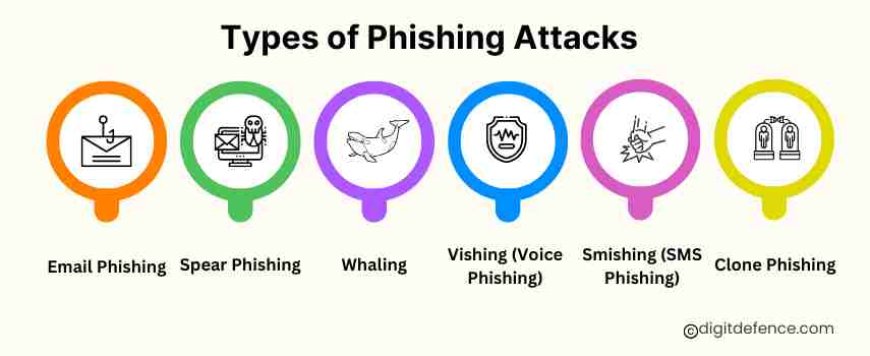
Phishing attacks can take many forms. Understanding these different types will help you recognize the various tactics cybercriminals use to trick you:
-
Email Phishing: This is the most common form of phishing. Attackers send fraudulent emails that appear to come from legitimate sources, such as a bank or social media platform, asking you to click on a link or download an attachment. The email often looks official and may include logos, official-sounding language, and urgent requests.
-
Spear Phishing: Unlike general phishing, spear phishing is highly targeted. Attackers personalize the message using specific information about the victim, such as their name, job position, or company details, to make the attack more convincing.
-
Whaling: A specific type of spear phishing, whaling targets high-profile individuals, such as CEOs or other executives. The attackers often impersonate a trusted authority figure or a government agency.
-
Vishing (Voice Phishing): This involves phone calls, where attackers impersonate a legitimate company or government agency to extract sensitive information, such as account numbers or passwords.
-
Smishing (SMS Phishing): Smishing is similar to vishing but uses text messages (SMS). Attackers send fraudulent SMS messages that often include a link to a malicious website or a phone number to call.
-
Clone Phishing: This involves creating a near-identical copy of a legitimate email or message that you’ve received in the past. Attackers then modify the link or attachment in the message, hoping that you won’t notice the subtle change.
Simple Steps to Prevent Phishing
Now that you understand the threat, it’s time to focus on practical, simple steps you can take to avoid falling victim to phishing attacks. Here’s a step-by-step guide to help you stay safe online:
1. Be Cautious with Emails and Links
-
Check the sender's email address: Phishing emails often come from addresses that look similar to a legitimate source but may have subtle differences. Always verify the sender's email domain.
-
Hover over links: Before clicking on any link in an email, hover your mouse over it to see the full URL. If the link doesn’t match the expected website address, don’t click on it.
-
Don’t trust unsolicited attachments: Avoid opening attachments from unknown or unexpected sources. Even if the email seems to be from a trusted contact, confirm with them first before downloading any files.
2. Look for Red Flags
-
Spelling and grammar mistakes: Phishing emails often contain spelling errors, awkward phrasing, or strange formatting. Legitimate companies typically send well-written, professional communication.
-
Urgent or threatening language: Phishing emails often use fear tactics, such as “Your account has been compromised” or “Immediate action required.” Don’t let the urgency cloud your judgment.
-
Generic greetings: Legitimate organizations typically use your name in correspondence. Phishing messages often use vague terms like “Dear Customer” or “Dear User.”
3. Don’t Share Personal Information Over Unverified Channels
-
Never share passwords or PINs: A legitimate company will never ask you to share sensitive information like passwords or credit card details via email or phone.
-
Phone verification: If you receive a call asking for sensitive information, don’t provide it immediately. Hang up and call the company’s official phone number to verify the request.
4. Enable Multi-Factor Authentication (MFA)
Two-factor authentication (2FA) adds an extra layer of security to your accounts. Even if attackers manage to steal your login credentials, they won’t be able to access your account without the second form of authentication (like a code sent to your phone or email).
5. Regularly Update Your Software
Keep your operating system, browsers, and antivirus software updated: Regular updates patch security vulnerabilities and reduce the risk of exploitation by cybercriminals.
6. Use Antivirus and Anti-Phishing Tools
-
Install reliable antivirus software: Many antivirus programs include anti-phishing features that detect malicious links, attachments, and websites. Ensure that the software is always up-to-date and running.
-
Browser add-ons: Consider installing anti-phishing browser extensions. These tools can automatically block malicious websites and warn you about potential phishing threats.
7. Educate Yourself and Others
-
Stay informed about phishing techniques: Phishing tactics evolve constantly, so it’s important to stay updated on the latest trends. Follow trusted sources like government agencies (e.g., CERT-In in India) and cybersecurity blogs.
-
Training for employees: If you manage a business, conduct regular phishing awareness training for your employees. This training can help them recognize phishing attempts and avoid falling for them.
8. Verify Suspicious Requests
If you receive a suspicious email or phone call requesting sensitive information, verify the request through an independent method. Contact the company or person directly using contact information from their official website.
What to Do if You’ve Fallen for a Phishing Attack?
Despite all precautions, phishing attacks are sometimes successful. If you believe you’ve fallen victim to phishing, it’s important to act quickly:
-
Change your passwords immediately: If you provided login credentials, change your passwords for the affected accounts. Use strong, unique passwords and enable two-factor authentication wherever possible.
-
Monitor your financial accounts: If you’ve shared financial information, immediately contact your bank or financial institution. Monitor your accounts for any unauthorized transactions.
-
Report the phishing attack: Report the incident to your email provider, your bank, or other relevant authorities. In India, you can report phishing attacks to CERT-In (Indian Computer Emergency Response Team).
-
Run a security scan: Use your antivirus or anti-malware software to scan your devices for any malicious software that might have been installed.
Case Study 1: Twitter – Preventing Phishing Attacks
Overview:
Twitter, a popular social media platform, is frequently targeted by phishing attacks. These attacks often involve fake emails or messages that appear to come from Twitter, attempting to steal user login details or spread harmful links. Protecting users from these threats is a major focus for the company.
Implementation:
To protect users, Twitter promotes the use of two-factor authentication (2FA), which adds an extra layer of security by requiring a second verification step (like a code sent to your phone). They also use AI-powered systems to detect and block suspicious activities, such as fraudulent login attempts. Twitter sends security alerts to users when unusual activity is detected on their accounts, helping them stay informed and take action against phishing attempts.
Outcome:
These security measures have helped reduce phishing attacks on Twitter. The combination of two-factor authentication (2FA), AI detection, and security alerts has made it harder for attackers to gain unauthorized access to accounts, improving overall account safety for users.
Case Study 2: PayPal – Protecting Users from Phishing
Overview:
PayPal, a leading online payment service, is a major target for phishing scams. Cybercriminals often send fake emails or create fraudulent websites that look like PayPal’s official communications, trying to steal sensitive financial information from users.
Implementation:
PayPal uses advanced fraud detection systems to monitor transactions for suspicious activity in real time. They also use email authentication technologies to ensure that phishing emails do not appear to come from PayPal. Additionally, PayPal encourages users to activate two-factor authentication (2FA) for extra security and provides regular security alerts to warn users about suspicious activities on their accounts.
Outcome:
Thanks to these measures, PayPal has successfully reduced phishing risks. The use of fraud detection, email authentication, and two-factor authentication (2FA) has made it more difficult for cybercriminals to steal user data. These efforts have helped maintain customer trust and keep transactions secure.
Phishing remains one of the most widespread and insidious cyber threats today, preying on human vulnerability and trust. However, by staying vigilant and following the simple steps outlined above, you can greatly reduce your risk of falling victim to these attacks. Remember, the key to preventing phishing is being aware, cautious, and proactive. With the right knowledge and tools, you can protect your sensitive information, avoid unnecessary risks, and continue to navigate the digital world with confidence. Stay informed, stay safe, and be cautious before you click.