How to Protect Your Business from Vishing Attacks
Learn how to protect your business from vishing attacks using employee training, verification protocols, call monitoring, and cyber security strategies.

Do you know if your business is safe from phone-based scams?
Are your employees, financial records, and sensitive company data protected from vishing in cyber security? Cybercriminals are no longer depending only on emails , they now use phone calls and voice messages, a type of voice phishing, to trick employees into sharing confidential information. Ignoring this threat can cost your business money, reputation, and customer trust.
In 2025, Cisco, a global leader in networking and cybersecurity, faced a vishing attack. A scammer impersonated a trusted entity and gained access to a third-party cloud-based system, exposing some customer data.
The attacker’s convincing impersonation exploited employee trust. Verification processes were not strong enough, and the breach was not detected immediately, increasing potential risks.
Cisco strengthened verification protocols for all access requests. Employees received training on recognizing vishing calls, and the incident response plan was updated for quicker detection and action.
What Is a Vishing Attack?
Vishing means voice phishing. It is a kind of cyberattack where criminals use phone calls or voice messages to trick people into giving private information, like passwords, credit card numbers, or company data.
Unlike phishing emails, vishers use real conversations to sound trustworthy. They often pretend to be from your bank, IT support team, or even a government office. During the call, they try to create panic or urgency, saying things like:
-
“Your account has been locked due to suspicious activity.”
-
“Please verify your details to avoid account suspension.”
-
“We have detected unusual activity in your business account.”
This kind of pressure makes people act fast without checking if the call is real, which is exactly what the attacker wants.
Common Ways Attackers Use Vishing Against Businesses
Attackers use vishing to trick employees and gain access to money, systems, or data. Here are the most common methods:
-
CEO / Executive Impersonation
Scammers pretend to be a company leader and call finance or HR asking for an urgent payment or confidential report. The request looks official and urgent, so staff act quickly.
-
Fake IT Support Calls
The caller claims to be from internal IT or an external vendor. They say there’s a security problem and ask for passwords, OTPs, or to install a “fix” (which is malware or remote access).
-
Vendor or Supplier Spoofing
Attackers pose as a known supplier and ask to change bank details for an invoice. Finance departments may update payment info without proper checks.
-
Payroll and HR Scams
Scammers contact HR or payroll asking for employee bank details, tax records, or personal IDs. This can lead to payroll fraud or identity theft.
-
Fake Audit or Regulator Calls
The caller says they are from a regulator or auditor and demand documents or access to systems, using fear of fines or legal trouble to force compliance.
How to Protect Your Business from Vishing Attacks
1. Educate and Train Employees
Awareness is your first line of defense. Conduct regular cybersecurity training sessions to help employees recognize and report suspicious calls. Teach them to:
-
Never share passwords or financial details over the phone.
-
Verify the caller’s identity through official channels.
-
Report any call that feels urgent or unusual.
2. Implement Caller Verification Protocols
Businesses should use multi-step verification before sharing sensitive data. For example:
-
Confirm internal requests through email or messaging tools.
-
Create a verification code system for phone-based communication.
-
Maintain an updated directory of verified contacts.
3. Use Technology for Protection
Adopt advanced call monitoring and threat detection tools that identify suspicious or spoofed numbers.
4. Create a Clear Reporting Process
Encourage employees to report any suspicious calls immediately. Have a clear internal communication chain . for example, a dedicated email or hotline for reporting vishing in cyber security attempts.
5. Regular Security Audits
Include social engineering simulations in your security assessments. Quarterly or annual vishing attack tests can help you evaluate how well your team identifies and responds to threats.
6. Encrypt and Limit Access to Sensitive Data
Even if a vishing attempt succeeds, limiting access can reduce damage. Use role-based access control, strong encryption, and regular password updates.
Practical Steps to Prevent Vishing Attacks
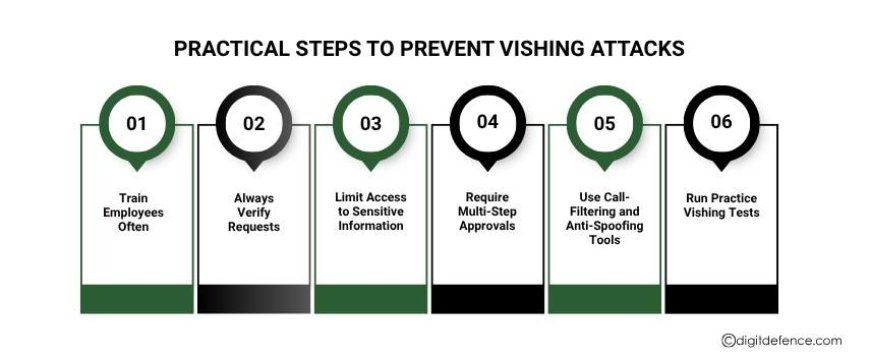
1. Train Employees Often
Teach staff about vishing attack means and how it works. Use real-life examples of scams so employees can spot suspicious calls. Encourage them to report any unusual or urgent requests.
2. Always Verify Requests
Never act on a phone call alone. If someone asks for money, passwords, or sensitive data, check the request through official channels, like corporate email or in-person confirmation.
3. Limit Access to Sensitive Information
Give access to financial systems or private data only to the right people. Even if a scammer succeeds, limited access reduces the risk.
4. Require Multi-Step Approvals
For payments or important changes, use two-step verification or multiple approvals. This stops one employee from making a decision alone that could cause a loss.
5. Use Call-Filtering and Anti-Spoofing Tools
Use software that blocks fake numbers and flags suspicious calls. Cybersecurity agencies offer tools that monitor calls in real time and protect your business.
6. Run Practice Vishing Tests
Simulate vishing attacks to see how employees react. This helps identify weak spots and improves awareness over time.
By following these practical steps, businesses can reduce the risk of vishing attacks, protect sensitive information, and strengthen overall security.
With the right policies, tools, and staff awareness programs, businesses can focus on growth while keeping company data, financial records, and customer information safe from vishing, phishing, smishing, and other cyber threats.