How Google’s Passkey Blocks Phishing Attempts?
Discover how Google’s Passkey helps protect users from phishing by replacing passwords with secure, device-based authentication.
Are you tired of hearing about massive data breaches caused by weak passwords?
Do you ever worry that someone might trick you into giving away your account details? Since most online hacks happen because of weak passwords, Google’s Passkey is now offering a much safer way to log in and protect your accounts.
Google says that after introducing passkeys, people were four times more successful at logging in compared to using passwords. The success rate went up from just 13.8% to 63.8%. Now, over 800 million Google accounts use passkeys, and there have been more than 2.5 billion safe logins so far.

KAYAK is a leading global travel search engine, helping millions of users compare prices and book flights, hotels, and rental cars. The brand is known for its user-friendly platform and commitment to delivering a seamless booking experience across web and mobile devices.
KAYAK faced several challenges before and during the implementation of Google’s Passkey. First, phishing threats were a critical concern, with cyber attackers frequently attempting to steal user credentials through deceptive emails and spoofed websites, putting both users and the brand at risk.
KAYAK addressed its challenges by integrating Google’s Passkey to create a secure and user-friendly authentication experience. Passkeys provided strong phishing resistance by tying credentials to the user’s device. This meant attackers could no longer use stolen password information on fake sites.
What is Google’s Passkey?
Google’s Passkey is a cutting-edge, passwordless authentication method based on strong public key cryptography standards developed by the FIDO Alliance. Instead of typing a password, users unlock their accounts with biometrics (fingerprint, facial recognition) or a device PIN, proving their identity directly.
The magic? The secret private key always stays on your device; only a signed public key is sent to Google, never your fingerprint, face, or PIN.
The Scope and Scale of the Phishing Problem
Phishing attacks keep changing, targeting everyone from ordinary users to executives, even Instagram boss Adam Mosseri fell for a sophisticated phishing scam aimed at Google account users. These attacks often use emails or fake websites to trick users into revealing passwords or two-factor authentication (2FA) codes.
Traditional SMS and email 2FA are now considered highly vulnerable; cybercriminals can intercept or socially engineer their way past these methods.
Why Are Passkeys So Effective Against Phishing?
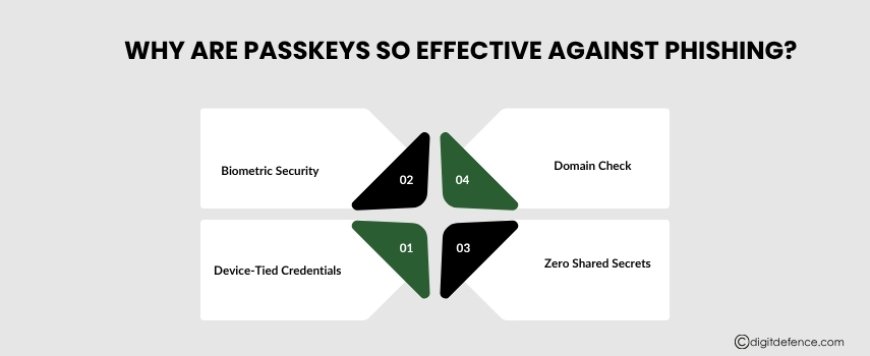
How Google’s Passkey neutralizes phishing:
-
Device-Tied Credentials: Passkeys are linked to your physical device. A phisher can’t trick you into “entering” a passkey on their bogus website; it simply won’t work elsewhere.
-
Biometric Security: Biometrics or device PINs are mandatory to unlock passkeys. Even if you lose your phone, no one can use your passkey without your face, fingerprint, or PIN.
-
Zero Shared Secrets: No typed password is sent ever. Unlike passwords or SMS codes, nothing can be stolen or reused in a phishing attack.
-
Domain Check: The device verifies it’s talking to the genuine Google website/app before authenticating. This eliminates “man-in-the-middle” attacks, where phishing sites impersonate Google to harvest secrets.
How Google’s Passkey Works (Step-by-Step)
-
Registration: You register a passkey with Google on a device (phone, tablet, Chromebook) using fingerprint, face, or PIN.
-
Authentication: When signing in, you unlock your device. Google verifies the cryptographic signature that can only be generated by your device.
-
No Password Required: No password is ever typed, stored, or transmitted. There’s nothing for hackers to steal or phish.
-
Cross-Platform: Works across Android, iOS, Windows, and Chrome, offering seamless authentication wherever you use Google services.
-
Account Recovery: If you lose your device, you can recover your account using pre-defined backup methods—Google ensures the process is both secure and simple.
Top Advantages of Using Google’s Passkey for Secure Access
Here are the top advantages of using Google’s Passkey for secure access, highlighting why it is a game-changer in authentication:
-
Strong Phishing Resistance
Google’s Passkey uses public key cryptography, where the private key is securely stored on the user’s device and never shared or transmitted. This means credentials cannot be intercepted or reused by attackers on fake websites, effectively blocking phishing attempts far better than passwords or traditional two-factor authentication methods.
-
Passwordless Authentication for Enhanced Security
Eliminating passwords removes vulnerabilities linked to weak, reused, or stolen passwords. Users sign in using biometrics (fingerprint, face recognition) or a device PIN, providing multi-factor protection without the need to remember or manage passwords.
-
Faster and More Seamless Login Experience
Passkeys enable users to sign in quickly, often in less than 15 seconds, cutting login time by up to 50% compared to passwords. The simplified biometric or PIN-based authentication greatly reduces user friction and login errors.
-
Cross-Platform and Device Synchronization
Google’s Passkey supports a wide range of devices and platforms, including Android, iOS, Windows, and Chrome. Passkeys are synced securely across devices linked to a Google account, allowing consistent and convenient passwordless access across all users’ devices.
-
Elimination of Shared Secrets and Central Data Risks
Because passkeys are based on cryptographic key pairs, only public keys are stored on servers, which are useless to attackers. This eliminates the risk of password leaks and credential stuffing attacks common in data breaches, greatly enhancing account security.
-
Built-in Two-Factor Authentication Capabilities
Passkeys combine “something you have” (the user’s device) and “something you are” (biometrics or PIN) into one streamlined step, delivering the security strength of multi-factor authentication without additional complexity.
Moreover, Google continually invests in expanding device compatibility and simplifying recovery options, ensuring the passkey experience remains resilient and accessible for everyone, from tech starters to security experts.
As passwordless authentication grows, Google’s Passkey is setting the gold standard for a safer internet, empowering a future where identity theft and phishing are throwbacks of the past and digital trust is rebuilt, one login at a time.
Ready to secure your digital future with Google’s Passkey and eliminate phishing risks?
Contact the experts at Digit Defence today!
Email us at [email protected] to discover how we can assist you in implementing passwordless authentication and protecting your business.