Most Common Cyber Threat Alerts and How to Prevent Them
Learn about common cyber threat alerts, understand their risks, and follow practical steps to prevent data loss, phishing, malware, and attacks.

Cyber threats are everywhere.
Every day, your email, phone, or system could be sending you warnings-Cyber Threat Alerts-that something isn’t right. Some people ignore them. Others panic.
But here’s the truth: every alert is a chance to act before disaster strikes. Ignoring them can cost you money, data, and even your reputation.
The question is simple: are you ready to protect yourself? Or will you be the next victim?
The solution is to act immediately by verifying the source of the alert, updating your software and passwords, enabling multi-factor authentication, and monitoring your systems closely for any unusual activity. Taking these steps ensures that a small warning today doesn’t turn into a major problem tomorrow.
Why Cyber Threat Alerts Matter
Cyber attacks are not just headlines, they’re real, and they’re growing.
- Over 90% of cyber attacks start with phishing emails.
- Small businesses face 43% of attacks, yet 60% close within six months of a breach.
- Global cybercrime costs are expected to reach ₹871.5 trillion by 2025.
Every alert you receive is a warning. Treat it like one.
Cyber threats don’t discriminate. They target individuals, small businesses, and large enterprises alike. In fact, hackers often start with small organizations because they assume weaker security. But the consequences can ripple far beyond one company customer data, vendor access, and even partner networks can be affected.
Common Cyber Threat Alerts You Might See
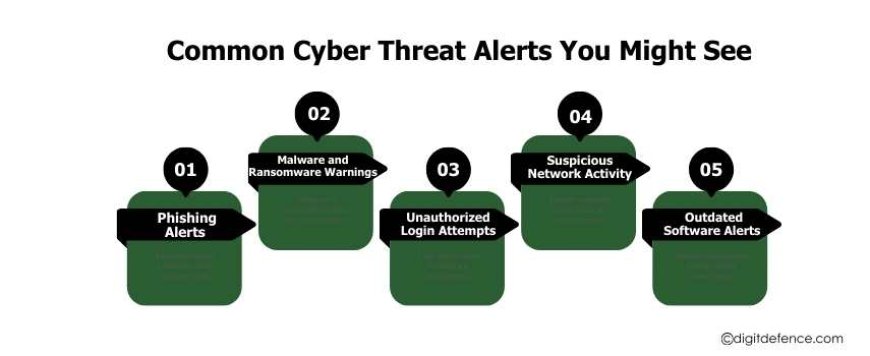
Understanding these alerts is the first step in prevention. Here’s what they usually mean:
1. Phishing Alerts
You get an email or message pretending to be from your bank, a coworker, or a service you trust.
Why it’s dangerous: Clicking links or entering info could hand hackers your passwords and sensitive data.
How to prevent it:
-
Verify the sender carefully.
-
Check links before clicking.
-
Enable multi-factor authentication (MFA).
Phishing attacks aren’t just “obvious” scams anymore. Modern phishing emails can look exactly like official communications. Hackers can copy logos, writing style, and even the email format of trusted companies. That’s why awareness is key, never assume an email is safe just because it looks real.
2. Malware and Ransomware Warnings
Your system might alert you about unusual activity, encrypted files, or suspicious programs.
Why it’s dangerous: Malware can steal or lock your data. Ransomware can demand payment for access.
How to prevent it:
-
Keep software up-to-date.
-
Install trusted antivirus programs.
-
Back up data regularly.
Ransomware has hit every sector hospitals, schools, and even government agencies. In 2023, a regional hospital faced a ransomware attack that disrupted patient care for days. The culprit? A single employee clicked on a phishing link. One alert was ignored, and the consequences were enormous.
3. Unauthorized Login Attempts
Notifications about login attempts from unknown locations or devices.
Why it’s dangerous: Someone could be trying to access your accounts.
How to prevent it:
-
Use strong, unique passwords.
-
Monitor login alerts.
-
Consider a password manager.
Even large companies with strong security systems face this issue. A 2022 report revealed that unauthorized login attempts increased by 35% across industries. Attackers often target login credentials first because they’re the gateway to everything else.
4. Suspicious Network Activity
Alerts about unusual spikes in network traffic or access from unknown IP addresses.
Why it’s dangerous: Hackers may be inside your network.
How to prevent it:
-
Monitor your network constantly.
-
Use VPNs for remote access.
-
Segment your network to limit access.
In modern work environments, especially with remote employees, networks are more complex than ever. One weak device can compromise an entire system if network monitoring is ignored.
5. Outdated Software Alerts
Warnings that your system or applications need updates.
Why it’s dangerous: Hackers exploit old software to gain access.
How to prevent it:
-
Enable automatic updates.
-
Remove unused applications.
-
Apply security patches promptly.
Older systems are often the entry point for cybercriminals. Even a minor delay in updating a software patch can open a window for attackers. In 2021, the famous Colonial Pipeline ransomware attack happened partly because of unpatched software vulnerabilities.
Inside the ShopMart Cyber Attack
In 2023, a mid-sized retail company, ShopMart, received multiple Cyber Threat Alerts about phishing attempts targeting employees. They ignored them. Within 48 hours, customer data was stolen, operations were halted, and the company faced a₹2.075 crore ransom demand.
The impact went beyond financial loss. Customer trust declined, and rebuilding the company’s reputation proved to be a long and challenging process.
Another example comes from 2022, when a logistics company faced a network breach. Attackers accessed routing systems and delayed shipments for over a week. It cost the company not just money, but client relationships.
The lesson is clear: alerts are not annoyances- they’re lifesaving warnings.
Why Businesses Often Ignore Alerts
It’s easy to see why businesses dismiss alerts:
-
Alert fatigue: Systems sometimes produce too many notifications, and staff assume some are false alarms.
-
Lack of understanding: Employees may not know how serious the alert is.
-
Overconfidence: Some believe their security is strong enough to handle any attack.
But ignoring alerts is like hearing a smoke alarm and leaving it be, you never know when it will signal a real fire.
Types of Cyber Threat Alerts You Should Know
Understanding the alerts is your first defense. Common types include:
-
Phishing alerts: Fake emails or messages asking for credentials.
-
Malware alerts: Suspicious files or apps on your system.
-
Ransomware alerts: Files being locked or encrypted.
-
Unauthorized login alerts: Multiple failed login attempts from unknown devices.
-
Network anomaly alerts: Unexpected spikes in traffic or strange behavior.
-
Outdated software alerts: Systems are missing critical updates.
-
Data breach alerts: Notifications that your data may have been exposed.
Pro tip: Never ignore an alert, no matter how small it seems.
Quick Safety Tips
-
Verify senders and links before interacting.
-
Use two-factor authentication wherever possible.
-
Update apps and software immediately.
-
Backup important data regularly.
-
Treat every alert as urgent and investigate immediately.
These simple actions reduce risk dramatically.
The Role of Employees in Cybersecurity
Your staff can be your strongest defense or your weakest link. Phishing attacks often succeed because employees aren’t trained to recognize red flags.
-
Conduct regular training sessions.
-
Simulate phishing attempts to test readiness.
-
Reward vigilance and responsible behavior.
A company with well-informed employees will see far fewer successful attacks. Awareness is as important as technology.
Can You Recover From a Cyber Attack?
Yes, but it’s difficult:
-
Data may be permanently lost.
-
Recovery by authorities can be slow and complex.
-
Legal options exist, but aren’t guaranteed.
The real takeaway: Prevention is always better than recovery. Acting on every Cyber Threat Alert immediately can save your business from disaster.
The Future of Cyber Threat Alerts
Cybersecurity is changing fast. Here’s what’s coming next:
-
AI-Powered Threat Detection: Real-time monitoring identifies attacks as they start.
-
Zero-Trust Networks: Every device and user is verified before access is allowed.
-
Edge Security: Security measures will be applied closer to devices for faster response.
-
Blockchain Authentication: Confirms identities and devices to reduce fraud.
-
Global Cyber Partnerships: Collaboration across companies and governments improves intelligence sharing.
Even with these technologies, people’s careful attention is still very important. Alerts only help if someone actually responds to them.
Stay Safe, Stay Ahead
Cyber threats aren’t going away - they’re changing. Every Cyber Threat Alert is a chance to prevent disaster. Don’t wait until it’s too late.
Businesses that take alerts seriously and act promptly often avoid the worst consequences. Customers trust companies that show they value data safety. Employees feel secure when their workplace has strong defenses.
Start your journey with Digitdefence today. From phishing to ransomware, our services protect your business and monitor your systems 24/7. Every alert you act on today could save your business tomorrow.