Top 5 Cyber Threats and Tips to Strengthen Your Security
Discover five common cyber threats and effective tips to improve your security strategy, protecting data from potential online risks.
In 2024, I’ve come to realize how important cybersecurity has become in our everyday lives. Whether you're a small business owner, a tech-savvy individual, or just someone who spends time online, cyber threats are more present and more complicated, than ever before. We live in an era where a simple click on the wrong link could lead to an advanced data breach, identity theft, or financial loss.
I’m going to share with you the top five cyber threats that we all face today. From ransomware attacks to phishing scams, each of these threats has the potential to disrupt our digital lives in significant ways. But don't worry, I’ll also provide some practical, easy-to-follow tips to strengthen your security and keep your data safe. My goal is to make cybersecurity simple, accessible, and actionable, so you can stay protected without feeling overwhelmed.
The Top 5 Cyber Threats
1. Phishing Attacks
What Are Phishing Attacks?
Phishing attacks involve cybercriminals sending deceptive emails or messages that appear to be from legitimate sources. These messages often contain malicious links or attachments designed to steal sensitive information, such as login credentials or financial details.
How to Recognize Phishing Attempts
-
Check the sender's email address: Look for inconsistencies or suspicious domains.
-
Beware of urgent requests: Phishing emails often create a sense of urgency to prompt quick action.
-
Look for spelling and grammar errors: Many phishing attempts originate from non-native speakers.
Tips to Prevent Phishing Attacks
-
Enable spam filters: Use advanced email filters to block suspicious messages.
-
Verify requests: Contact the supposed sender through a known, trusted method to confirm the request's legitimacy.
-
Educate employees: Conduct regular training sessions on recognizing phishing attempts.
2. Ransomware
What Is Ransomware?
Ransomware is a type of malware that encrypts a victim's files, rendering them inaccessible until a ransom is paid. These attacks can cripple businesses by halting operations and causing significant financial losses.
How Ransomware Infiltrates Systems
-
Email attachments: Ransomware often spreads through malicious attachments.
-
Infected websites: Visiting compromised websites can result in automatic downloads of ransomware.
-
Software vulnerabilities: Outdated software can be exploited to install ransomware.
Tips to Prevent Ransomware Attacks
-
Regular backups: Maintain up-to-date backups to restore data without paying the ransom.
-
Update software: Keep all software and systems updated to patch vulnerabilities.
-
Use antivirus software: Deploy reputable antivirus solutions to detect and block ransomware.
3. Malware
Malware, short for malicious software, includes various types of harmful programs such as viruses, worms, trojans, and spyware. These programs can steal data, damage systems, and compromise security.
How Malware Spreads
-
Downloadable files: Malware can be hidden in software downloads.
-
Infected devices: Connecting an infected USB drive can spread malware.
-
Malicious links: Clicking on malicious links can trigger malware downloads.
Tips to Prevent Malware Infections
-
Install antivirus software: Use comprehensive antivirus programs to detect and remove malware.
-
Avoid suspicious downloads: Only download software from trusted sources.
-
Regular scans: Perform regular system scans to detect and remove malware.
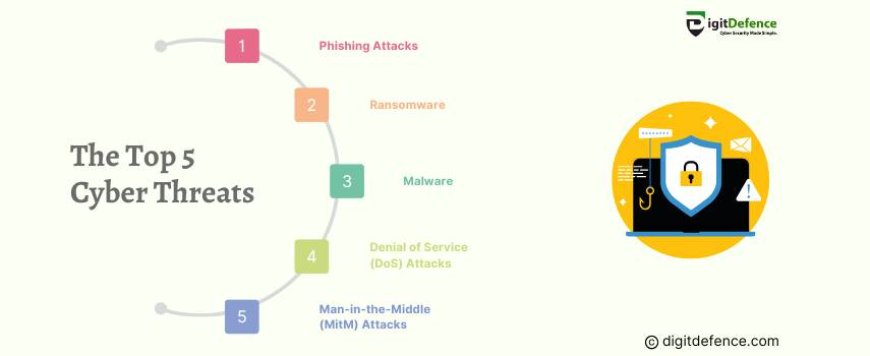
4. Denial of Service (DoS) Attacks
What Are DoS Attacks?
Denial of Service attacks aim to disrupt the normal functioning of a website or online service by overwhelming it with a flood of traffic. This can result in website downtime, loss of revenue, and damage to reputation.
How DoS Attacks Are Executed
-
Botnets: Attackers use networks of infected devices to generate traffic.
-
Exploiting vulnerabilities: Attackers target specific weaknesses in a system.
-
Amplification attacks: Using techniques to increase the volume of traffic directed at a target.
Tips to Mitigate DoS Attacks
-
Implement firewalls: Use web application firewalls to filter and block malicious traffic.
-
Load balancing: Distribute traffic across multiple servers to prevent overload.
-
Monitor traffic: Regularly monitor network traffic to identify and respond to unusual patterns.
5. Man-in-the-Middle (MitM) Attacks
What Are MitM Attacks?
Man-in-the-middle attacks occur when an attacker intercepts and alters communication between two parties without their knowledge. This can lead to data theft and unauthorized access.
How MitM Attacks Happen
-
Public Wi-Fi: Unsecured Wi-Fi networks are common targets for MitM attacks.
-
Compromised devices: Attackers can use malware to intercept communications.
-
Phishing: Cybercriminals can use phishing techniques to gain access to communication channels.
Tips to Prevent MitM Attacks
-
Use VPNs: Virtual Private Networks encrypt your internet traffic, making it harder for attackers to intercept.
-
Avoid public Wi-Fi: Refrain from accessing sensitive information on public networks.
-
Secure websites: Ensure websites use HTTPS to encrypt data exchanged between you and the site.
Case Study: The 2017 WannaCry Ransomware Attack
In May 2017, the world witnessed one of the most devastating ransomware attacks to date. The WannaCry ransomware exploited a vulnerability in Microsoft’s Windows operating system, encrypting files and demanding a ransom payment in Bitcoin for decryption. This attack targeted hospitals, businesses, and government institutions across 150 countries, affecting critical systems and causing widespread disruption.
The Impact
The WannaCry attack paralyzed many organizations, particularly in the healthcare sector. In the UK, the National Health Service (NHS) was severely affected, with appointments canceled and emergency departments forced to turn away patients. This attack highlighted the vulnerability of critical infrastructure and the ripple effects a ransomware attack could have on society.
Key Takeaways
The WannaCry attack exploited a vulnerability (dubbed “EternalBlue”) that had already been patched by Microsoft in March 2017. However, many organizations had not applied this update, making them susceptible to the attack. This case underscores the importance of regular software updates, strong security protocols, and comprehensive incident response planning.
Lessons Learned for Improved Security
-
Update and Patch Systems Promptly: Had affected organizations applied Microsoft’s patch, the impact of WannaCry could have been significantly reduced. Regular patch management is a fundamental cybersecurity practice.
-
Back-Up Critical Data: A robust backup system allows organizations to restore operations without paying a ransom. Regular, secure backups mitigate the damage caused by ransomware attacks.
-
Adopt Network Segmentation: By dividing networks into segments, organizations can limit the spread of malware, minimizing the scope of any potential attack.
-
Employee Awareness and Training: Basic cybersecurity training can help employees recognize suspicious emails or messages, which is crucial for preventing similar ransomware attacks.
General Tips to Strengthen Your Cybersecurity
Beyond addressing these specific threats, adopting general cybersecurity best practices can help you build a resilient security posture. Here are some universal strategies for staying safe online:
-
Regularly Update Passwords and Use Strong Authentication
-
Use complex passwords (a mix of letters, numbers, and symbols) and change them periodically. Password managers can help manage and generate secure passwords.
-
Enable two-factor or multi-factor authentication wherever possible to add an extra layer of security.
-
Conduct Regular Security Audits
-
For businesses, regular security audits are crucial to identify and patch vulnerabilities in systems. Security audits involve assessing the efficacy of security measures, scanning for vulnerabilities, and testing response plans for potential breaches.
-
Educate Yourself and Your Team
-
Cybersecurity is a shared responsibility, so ensure that everyone in your organization, household, or network understands basic security principles and remains vigilant.
-
Employ Endpoint Protection Tools
-
As remote work has increased, so has the number of endpoints, such as laptops, smartphones, and tablets. Use endpoint security tools to protect each device that accesses your network or data.
-
Develop a Response Plan
-
Be prepared for the worst. Have a plan that outlines the steps you’ll take in the event of a cyber incident, including notifying stakeholders, isolating affected systems, and restoring data from backups.
Staying vigilant against cyber threats requires a proactive approach to cybersecurity. By understanding the top threats and implementing the tips provided, you can significantly reduce your risk of falling victim to cyberattacks. Regularly update your knowledge and security practices to keep pace with the changing environment of cyber threats.