Are You Making This Secure Access Error in Your Network?
Learn how secure access mistakes put your business network at risk and find simple ways to manage user access, prevent data exposure, and improve security.

Have you ever felt confident that your business network was safe until something made you question it?
A strange login alert.
An employee accessing files they shouldn’t.
A device connecting from an unknown location.
Most businesses don’t realise that the biggest threat to their network is not always hackers. Sometimes it is a simple secure access mistake happening inside the system, unnoticed, until it turns into a problem.
Many companies assume passwords, antivirus software, and firewalls are enough. But secure access is much deeper than that. It is about controlling who can enter, what they can reach, and how safely they can move inside your network.
This is where most businesses slip - and this mistake is far more common than people think.
The Hidden Problem Most Businesses Miss
Many companies think secure access only means:
-
Passwords
-
Antivirus
-
firewalls
But here’s the painful truth:
Secure access is not just about blocking outsiders - it’s about controlling insiders.
Most security incidents today are caused by:
-
employees using personal devices
-
shared passwords
-
remote logins with no verification
-
Old staff still having access after leaving
-
access levels that are the same for everyone
These mistakes feel small.
But small mistakes are where big breaches start.
According to recent industry reports:
-
74% of data breaches involve weak or mismanaged access
-
61% of companies don’t track who accesses what
-
45% of employees admit they share passwords at work
This means even good people…
in good companies…
can create bad risks.
A Short Story You Will Relate To
Imagine a business like yours.
Growing. Busy. Focused on customers.
One day, a former employee still has login access.
Not because someone meant to leave it…
But because no one remembered to remove it.
That login is later used from another country.
Files are copied.
Customer data is viewed.
The company only finds out after clients complain.
There was no hacking tool.
No malware.
No phishing email.
Just one secure access error.
And the cost?
-
lost clients
-
lost trust
-
lost sleep
-
and months of recovery
This happens every day - especially to small and mid-size businesses that believe they are “not a target.”
But here is a secret:
Cyber attacks don’t choose large companies. They choose small companies.
And insecure access makes you vulnerable.
Why This Error Hurts More Than You Think
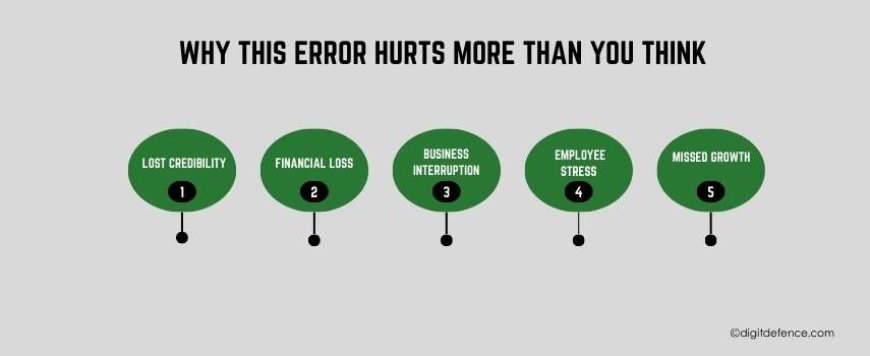
Making a secure access mistake not only risks data.
It affects real business outcomes:
1. Lost credibility
Clients expect safety.
One security incident can damage a reputation permanently.
2. Financial loss
Downtime, recovery, legal warnings - they all cost money.
3. Business interruption
Work stops when systems must be checked or shut down.
4. Employee stress
People fear blame, even when the fault was the system.
5. Missed growth
When security becomes a crisis, innovation freezes.
And here’s the emotional part:
You worked hard to build your business - one mistake should not take it away.
So, What Is the Common Secure Access Error?
Here it is in simple words:
Giving more access than necessary and not controlling who gets it.
This includes:
-
Everyone is using the same credentials
-
Giving full access instead of limited access
-
not updating access when roles change
-
trusting devices without verification
-
no monitoring who logs in or from where
This is called over-permissioning
And it is one of the biggest weak points in modern networks.
How to Fix It Without Stress or Complexity
Here are practical steps any business can start today:
-
Give access based on role, not convenience
Only give people access to what they actually need.
-
Remove access the moment someone leaves
Don’t wait. Don’t postpone. Don’t assume.
-
Use multi-factor authentication
A second step stops most unauthorized logins.
-
Track login activity
You should always know who accessed what and when.
-
Protect remote and mobile access
Work-from-anywhere should not mean access-from-anywhere.
-
Use secure access tools
Modern solutions automate what humans forget.
These steps don’t just prevent threats
They build confidence, order, and clarity inside your business.
The Opportunity Others Will Miss
Here is where the real advantage begins.
Most businesses only fix access problems after something goes wrong.
But the companies that succeed in the future will be the ones who:
-
secure their systems before there is a breach
-
Protect customer trust before losing it
-
Use security as a competitive advantage
-
show clients they act responsibly
In a world where threats grow daily…
Being ahead is the only safe place to be.
Why Secure Access Matters More Now Than Ever
Business today is different:
-
remote teams
-
cloud platforms
-
shared data
-
online operations
-
mobile workflows
This means your network no longer has walls.
Your access points are everywhere.
So secure access is no longer optional
It is the foundation of modern business survival.
Companies that understand the growth.
Companies that ignore it fall behind.
Which side do you want to be on?
You Don’t Have to Handle This Alone
If you’re reading this and thinking:
“I don’t know where my risks are.”
“I don’t have time to manage this.”
“I don’t want to make a mistake.”
You are not alone - and you don’t have to figure it out yourself.
DigitDefence helps businesses:
-
Assess secure access risks
-
Set proper access rules
-
Protect networks from unauthorized entry
-
secure remote work and devices
-
prevent insider and outsider threats
So you can focus on growth…
without fear, without doubt, without uncertainty.
Future Trends in Secure Access
Secure access is changing fast because businesses now work online, use the cloud, and have teams working from different places. The old way of protecting networks is no longer enough. New methods are helping companies stay safe, reduce risks, and control who enters their systems more accurately.
Key Trends to Watch
1. Login Without Passwords
Many companies will move away from passwords because they are easy to steal. Instead, they will use:
-
fingerprints or face recognition
-
security keys
-
trusted devices
This makes access safer and harder for attackers to break.
2. Zero Trust Becomes Common
Zero Trust means no user is trusted automatically. Everyone must prove who they are every time. This includes:
-
checking identity again and again
-
giving access only to what someone needs
-
watching for strange behaviour
3. Smarter Security With AI
Artificial intelligence will help find unusual logins or risky activity faster. It will:
-
alert when access looks suspicious
-
Stop access if danger is detected
-
reduce manual checking
4. Stronger Access for Remote Workers
Since people work from home, cafes, and travel, businesses will protect:
-
logins from outside the office
-
personal or shared devices
-
short-term staff or freelancers
5. Identity Becomes the Main Protection
Instead of protecting just the network, companies will protect identities. This means:
-
tracking who has access at every stage
-
removing access when jobs change
-
making sure devices belong to the right user
6. Dividing Networks Into Smaller Sections
Networks will be broken into smaller parts, so even if someone gets in, they cannot move around easily.
This reduces:
-
data exposure
-
internal misuse
-
spread of attacks
Where Smart Businesses Gain the Lead
Your business deserves safety.
Your customers deserve protection.
Your hard work deserves security.
Don’t wait for a warning sign.
Don’t wait for regret.
Don’t wait for damage.
Act before the threat arrives.
Start your journey with DigitDefence today - and make your network a place where only the right people have the right access at the right time.
Because the smartest businesses don’t react.
They prepare.