How IAM Tools Strengthen Access Control
Learn how IAM tools strengthen access control by managing user access, enforcing MFA, monitoring activity, and protecting business data from cyber threats.

Do you know who really has access to your company’s sensitive data?
Today, employees, partners, and contractors are always logging into different systems, apps, and databases. Without proper control, it’s hard to make sure that only the right people can see the right information. One small mistake can lead to a data breach, legal problems, or financial loss.
This is where Identity and Access Management (IAM) tools help. IAM tools keep your systems secure by giving you central control, automatic management of who can access what, and real-time monitoring. This way, your business stays safe, and employees can work without any interruptions. With IAM, you always know who has access to what and that it’s safe.
What is Identity and Access Management (IAM)?
Identity and Access Management (IAM) refers to a framework of policies, processes, and technologies that ensure the right individuals can access the right resources at the right time. It combines authentication (proving who a person is) and authorization (defining what that person can do).
IAM tools include solutions like:
-
Single Sign-On (SSO): One login for multiple applications.
-
Multi-Factor Authentication (MFA): Adding extra layers of security beyond a password.
-
Privileged Access Management (PAM): Protecting high-level administrator accounts.
-
User Lifecycle Management: Handling onboarding, role changes, and offboarding of employees.
Common Challenges in Access Control
Access control is critical for protecting sensitive data, but many organizations face significant challenges in managing it effectively. Understanding these challenges helps explain why IAM tools are essential.
1. Password Overload and Weak Credentials
Employees often juggle multiple accounts and may reuse weak passwords across systems. This makes it easier for hackers to gain unauthorized access.
2. Insider Threats
Not all cyber threats come from the outside. Unmotivated employees or careless staff can intentionally or accidentally misuse their access privileges, leading to data leaks or system compromises. Traditional access controls struggle to monitor and limit such insider risks.
3. Shadow IT and Unauthorized Applications
Many employees use apps and tools without IT approval, creating shadow IT environments. These unmanaged applications can bypass traditional security controls, increasing the risk of breaches and compliance violations.
4. Managing Access in Remote Work Environments
With hybrid and remote work becoming standard, employees access systems from multiple devices and locations. Traditional on-premises access controls may not handle this dynamic environment effectively, leaving security gaps.
5. Complexity of Compliance Requirements
Regulations like HIPAA, GDPR, and PCI-DSS require strict control over who can access sensitive data. Many organizations struggle to meet these requirements with manual or outdated access control methods.
6. Orphaned and Privileged Accounts
Employees changing roles or leaving the company can leave orphaned accounts with active access. Privileged accounts, if not properly monitored, can be a prime target for cyber attackers.
Top IAM Tools in 2025
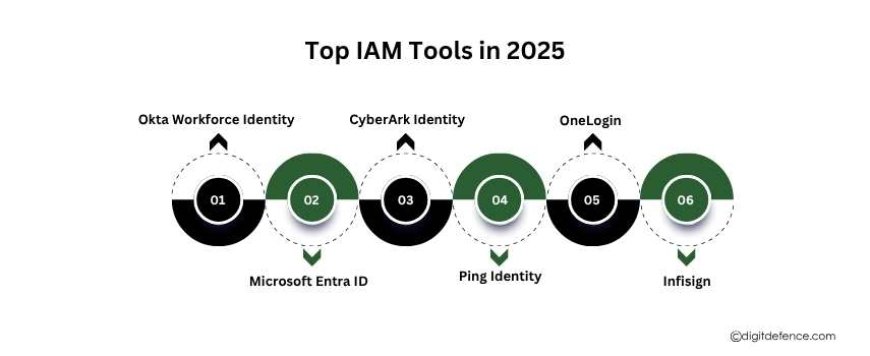
1. Okta Workforce Identity
-
Best for: Seamless app integration and strong multi-factor authentication (MFA).
-
Highlights: Offers adaptive MFA, automatic user provisioning, and smart risk detection.
-
Recent Update: Acquired Axiom Security to enhance Privileged Access Management (PAM) capabilities, including Just-In-Time (JIT) access and automated workflows.
2. Microsoft Entra ID (formerly Azure Active Directory)
-
Best for: Organizations heavily utilizing Microsoft 365 and Azure.
-
Highlights: Provides Single Sign-On (SSO), context-based smart access control, and automatic compliance reporting.
-
Integration: Seamlessly integrates with Microsoft applications and services.
3. CyberArk Identity
-
Best for: Protecting privileged accounts and sensitive infrastructure.
-
Highlights: Offers enterprise-level security for admin accounts, blocking credential theft attempts, and monitoring admin activities.
-
Recent Development: Enhanced with AI-powered application connectors and centralized administration for both on-prem and cloud resources.
4. Ping Identity
-
Best for: Comprehensive enterprise identity governance.
-
Highlights: Supports Single Sign-On (SSO), multi-factor authentication (MFA), and adaptive authentication.
-
Use Case: Ideal for large enterprises and complex hybrid environments.
5. OneLogin
-
Best for: Streamlined cloud-based identity management.
-
Highlights: Provides Single Sign-On (SSO), multi-factor authentication (MFA), and automated user provisioning.
-
Use Case: Suitable for organizations seeking strong MFA and seamless app integration.
6. Infisign
-
Best for: Advanced passwordless security and AI-driven IAM.
-
Highlights: Offers passwordless authentication, AI access assist, and non-human identity management.
-
Use Case: Ideal for businesses seeking advanced passwordless security and AI-driven IAM solutions.
How IAM Tools Strengthen Access Control
1. Centralized Identity Management
IAM tools provide a single, unified platform to manage all user accounts. Instead of manually handling logins for every application, IT teams can integrate everything into one system. This reduces human error, improves efficiency, and ensures no unauthorized accounts go unnoticed.
2. Stronger Authentication Mechanisms
IAM tools enforce multi-factor authentication (MFA), such as biometrics, mobile OTPs, or hardware tokens. Even if a password is stolen, attackers cannot break in without the second layer of verification.
3. Role-Based and Attribute-Based Access
IAM allows fine-grained control by assigning access rights based on job roles (RBAC) or attributes like department, location, or device type (ABAC). For example, an HR executive can access payroll data but not customer financial records.
4. Privileged Access Management (PAM)
Administrator accounts are prime targets for attackers. IAM tools safeguard them by enforcing temporary access, session monitoring, and password vaulting. This reduces the risk of internal misuse or external compromise.
5. Automated Provisioning and De-Provisioning
When an employee joins, changes roles, or leaves, IAM tools automatically adjust or revoke access. This prevents “orphan accounts” (inactive accounts still linked to systems), which are major security gaps.
6. Improved Compliance and Audit Readiness
Industries like healthcare, finance, and retail face strict compliance rules (HIPAA, PCI-DSS, GDPR). IAM solutions generate detailed logs of who accessed what and when, helping businesses stay compliant and pass audits easily.
7. Enhanced User Experience
With Single Sign-On (SSO), employees don’t waste time managing multiple logins. This balance of security + convenience boosts productivity while maintaining strong access control.
Practical Steps to Implement IAM Successfully
Implementing Identity and Access Management (IAM) tools effectively requires careful planning and a structured approach. Businesses that follow best practices can strengthen access control, reduce security risks, and ensure compliance. Here are the key practical steps:
1. Assess Current Access Control Policies
Before implementing IAM, evaluate your existing access control framework:
-
Identify who has access to which systems and data.
-
Detect orphaned accounts, excessive privileges, or outdated roles.
-
Determine areas where manual processes could be automated.
This assessment provides a clear baseline for planning your IAM strategy.
2. Define Access Policies and Roles
Create role-based and attribute-based policies aligned with business needs:
-
Assign roles according to job responsibilities.
-
Use attributes like department, location, or device type to refine access.
-
Apply the principle of least privilege, and employees get only the access they need.
Clearly defined policies reduce confusion and prevent unauthorized access.
3. Select the Right IAM Solution
Choosing the right IAM tool is critical. Consider:
-
Integration capabilities: Ensure it works with your existing applications, cloud services, and on-premises systems.
-
Security features: Look for MFA, adaptive authentication, and privileged access management.
-
Scalability: Choose a solution that can grow with your organization.
-
Compliance support: Ensure it supports audit logging and reporting for regulatory requirements.
4. Implement Multi-Factor Authentication (MFA)
MFA adds an extra layer of protection beyond passwords:
-
Use OTPs, biometrics, or hardware tokens.
-
Enforce MFA for sensitive systems and privileged accounts.
-
Consider adaptive MFA to challenge logins based on risk factors like location or device.
5. Automate User Provisioning and De-Provisioning
Automated onboarding and offboarding ensure that access rights are granted and revoked in real time:
-
New employees receive the correct access immediately.
-
Role changes automatically adjust permissions.
-
Departing employees’ accounts are disabled promptly to prevent unauthorized access.
Automation reduces human error and improves operational efficiency.
6. Monitor and Audit Access Activities
Continuous monitoring helps detect anomalies:
-
Track user logins, access requests, and privileged activities.
-
Generate audit-ready reports for compliance and internal reviews.
-
Set up alerts for suspicious behavior to respond quickly.
Monitoring provides both security and accountability, deterring insider threats
Keeping your business data safe starts with controlling who can access it. IAM tools make this easy by managing permissions, adding extra security checks, tracking user activity, and handling accounts automatically.
With IAM, businesses can reduce the risk of hacks, protect sensitive information, follow rules, and make work easier for employees.
In short, using IAM tools isn’t just about security , it’s a smart way to keep your business safe, build trust, and grow successfully.