What is Security Misconfiguration?
Learn what security misconfiguration is, its causes, impacts, prevention methods, case studies, and how businesses can secure networks effectively.

Small mistakes in system settings can cause big problems fast. Leaving default passwords, open ports, or cloud storage exposed may seem harmless, but attackers can exploit these errors immediately, leading to data breaches, downtime, and financial loss.
Recent studies show that over 25% of data breaches are caused by security misconfigurations, and the average cost per breach is ₹37 crore.
Proper detection, monitoring, and configuration management help prevent these risks, protect sensitive data, and ensure smooth business operations over time.
Verizon Data Leak (2020)
In 2020, Verizon accidentally exposed thousands of customer records, including names, phone numbers, and account details, due to a misconfigured cloud database. The data was publicly accessible online without any hacking.
The main challenge was that sensitive customer data could be accessed by anyone, risking privacy violations, regulatory scrutiny, and loss of customer trust.
Verizon immediately secured the database, restricted public access, and implemented regular monitoring and audits. They also reinforced internal security policies to prevent future misconfigurations.
What is Security Misconfiguration?
Security misconfiguration is the errors that occur when security settings are not configured or implemented properly.
In simpler terms, it means that the protective layers designed to keep your data safe are set up incorrectly or left incomplete, giving attackers an opportunity to exploit weaknesses.
This could happen for many reasons, such as leaving default passwords unchanged, enabling unnecessary features or ports, not applying security patches, or exposing cloud storage without proper access control.
When these errors occur, they can make even a strong system vulnerable, allowing hackers to gain unauthorized access, steal sensitive data, or disrupt operations.
Why Do Security Misconfigurations Occur?
Security misconfigurations usually happen because of human error, lack of awareness, or poor maintenance. Even with advanced tools, simple mistakes can open doors to major cyber risks. Here are the main reasons why they occur:
-
Default Settings Left Unchanged
Many systems and software come with default usernames, passwords, or configurations. When organizations fail to update them, attackers can easily exploit these weak points.
-
Unnecessary Features or Services Enabled
Extra features like debugging tools, unused ports, or sample applications often remain active after deployment. These unused components can become entry points for hackers.
-
Incomplete or Inconsistent Configurations
When different teams handle parts of a system, security settings can vary. Missing encryption, weak authentication, or inconsistent firewall rules can create gaps in protection.
-
Lack of Regular Updates and Patches
Systems that aren’t regularly updated with the latest patches are at high risk. Outdated software often contains known vulnerabilities that attackers can easily exploit.
-
Weak Access Controls
Giving users more permissions than necessary (known as “privilege creep”) increases the risk. Misconfigured access rules can allow unauthorized users to access sensitive information.
-
Cloud Misconfigurations
As businesses move to the cloud, many forget to adjust their security settings. Publicly accessible storage buckets or open databases are common cloud misconfiguration issues.
What Is the Impact of Security Misconfiguration?
The impact of security misconfiguration refers to the harm caused when a system, application, or network is not properly set up or protected. Even one misconfigured system can open a backdoor for attackers to exploit. Here’s a breakdown of the major impacts explained in simple terms.
1. Data Breaches
When security settings are weak or misconfigured, sensitive information such as customer details, payment data, or business records can be easily exposed or stolen. A single data breach can affect thousands of users and lead to financial and legal troubles.
Example:
An exposed cloud storage bucket or open database could leak confidential customer data to the public.
2. Financial Losses
Recovering from a security incident can be extremely costly. Businesses often spend money on investigations, recovery, legal actions, and compensation to affected users.
3. Business Downtime
Attackers exploiting misconfigurations can disable critical systems, causing business operations to stop temporarily. This downtime affects productivity, disrupts customer service, and can even lead to lost revenue.
4. Damage to Reputation and Trust
Customers trust businesses to protect their information. A single data exposure incident can destroy that trust. Once a company’s name appears in a cyberattack headline, rebuilding reputation becomes difficult and time-consuming.
5. Regulatory Fines and Legal Issues
Many industries must follow strict data protection laws such as GDPR, HIPAA, or India’s DPDP Act. If a misconfiguration leads to data exposure, organizations may face heavy fines, compliance penalties, or even lawsuits.
6. Unauthorized Access and Privilege Escalation
Hackers can take advantage of weak configurations to gain admin-level access. Once inside, they can install malware, steal credentials, or control internal systems.
Example:
Leaving default admin credentials unchanged allows attackers to log in easily and take over the entire system.
How to Prevent Security Misconfiguration
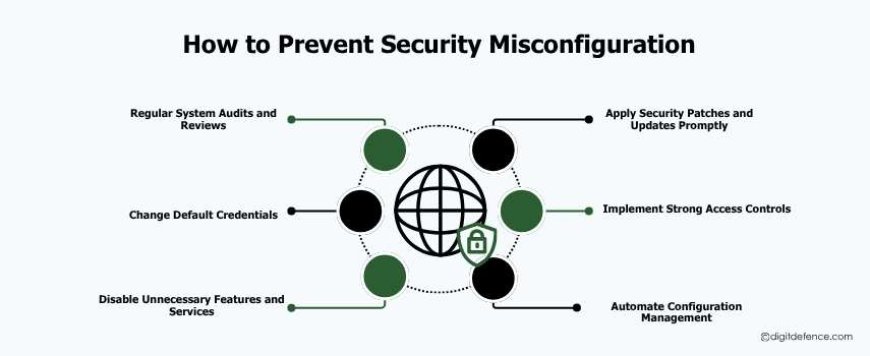
Preventing security misconfigurations is crucial to protecting your business systems, data, and reputation. Even small errors can lead to major breaches, so a proactive approach is necessary. Here are practical steps to prevent misconfigurations:
1. Regular System Audits and Reviews
Conduct frequent audits of your servers, databases, applications, and cloud systems. Regular reviews help detect misconfigurations before attackers can exploit them.
Tip: Use automated tools to scan for weak settings or unusual configurations.
2. Change Default Credentials
Always replace default usernames and passwords with strong, unique credentials. Default settings are one of the easiest ways for attackers to gain access.
3. Disable Unnecessary Features and Services
Turn off unused ports, debug modes, sample files, and extra plugins. Every active feature is a potential entry point for hackers.
4. Apply Security Patches and Updates Promptly
Keep software, applications, and operating systems updated. Security patches fix known vulnerabilities that attackers often exploit.
5. Implement Strong Access Controls
Follow the principle of least privilege, give users only the permissions they need. Regularly review user roles to prevent privilege creep.
6. Automate Configuration Management
Use tools like CSPM (Cloud Security Posture Management), SIEM (Security Information and Event Management), or endpoint security solutions to monitor configurations automatically. Automation reduces human errors.
The Future of Detecting Security Misconfigurations
Detecting and fixing security mistakes in systems is changing. Here’s what the future will look like:
-
Always Watching: Systems will be checked all the time to find mistakes quickly.
-
Stop Problems Early: Tools will spot risks before hackers can use them.
-
Learn Normal Behavior: Systems will notice unusual changes, like open ports or wrong permissions.
-
Fix Problems Automatically: Common mistakes can be corrected without waiting for humans.
-
Predict Risks: Tools will guess where future problems might happen based on system changes or unusual activity.
-
Easy Reports: IT teams will get simple reports to see risks and what to fix first.
-
Quick Response: Problems will be fixed faster, keeping systems safe and running smoothly.
Security mistakes in systems, networks, or cloud setups can cause big problems, like data leaks, money loss, or harm to a company’s reputation.
The best way to stay safe is to check systems often, use strong access controls, update software regularly, and watch for mistakes. Fixing problems early keeps your business and customer data safe and secure.