Cyber Security Tips to Protect Your Online Life
Learn practical cyber security tips to safeguard your online life, including advice on passwords, phishing, and device protection.


As we spend more time online whether for work, shopping, or socializing I've realized how important it is to take steps to protect my personal information and digital life. From managing passwords to securing accounts, I’ve learned that a few simple habits can make a huge difference in keeping my data safe. Cyber threats like phishing, hacking, and identity theft are becoming more common, and it’s easy to feel overwhelmed. But over time, I’ve discovered that making small changes, like using stronger passwords or enabling two-factor authentication, can significantly reduce the risks of falling victim to cybercrime.
In my experience, cybersecurity isn't about being suspicious; it's about being proactive. By taking a few simple precautions such as regularly updating software, using secure Wi-Fi networks, and being cautious with what I share online I’ve been able to feel much more confident in protecting my online presence. Cybersecurity doesn't have to be complicated, and once you start implementing these easy-to-follow tips, it becomes second nature. The key is staying informed and consistently practicing good security habits to ensure that your digital life remains secure.
What is cyber security?
Cyber security refers to the practice of protecting systems, networks, and data from cyber threats such as hacking, phishing, malware, and more. It involves a set of strategies, tools, and processes to defend against unauthorized access, theft, or damage to digital assets. Given how much of our personal and professional lives are connected to the internet, cyber security is more important than ever.
Why is Cyber Security Important?
The rise of digital platforms, increased internet usage, and the growing sophistication of cyber criminals make it imperative to focus on online security. The consequences of ignoring cybersecurity can be severe, ranging from financial loss and identity theft to reputational damage and data breaches. According to Cybersecurity Ventures, global cybercrime costs are predicted to hit $10.5 trillion annually by 2025, which underscores the growing threat to individuals and businesses alike.
Here are just a few reasons why cybersecurity is crucial:
-
Protection of Personal Data: Your personal information, such as banking details, passwords, and private messages, is valuable to cybercriminals. Protecting this data ensures your privacy.
-
Preventing Financial Loss: Cyber criminals target individuals and businesses for financial gain. Strong cyber defenses can prevent your bank accounts and credit card details from being compromised.
-
Preserving Digital Identities: Identity theft is one of the most common consequences of poor cybersecurity practices. Strong safeguards ensure that your online identity remains protected.
Cyber Security Tips for Individuals
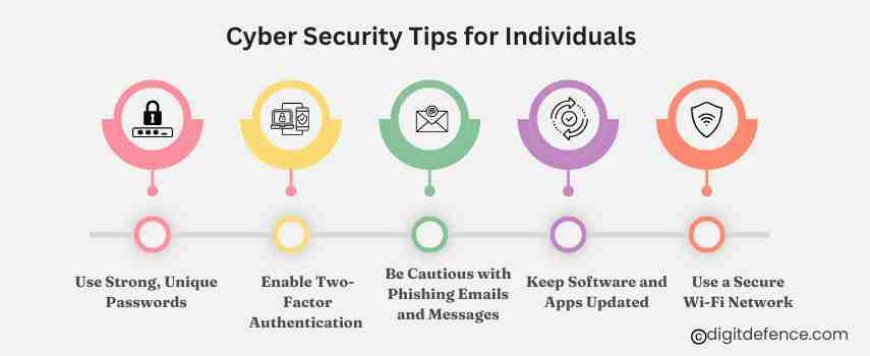
As an individual, you may feel overwhelmed by the thought of cyber threats, but the good news is that simple, everyday steps can significantly reduce your risk of falling victim to cybercrime. Here are some practical cyber security tips you can implement to protect yourself online:
1. Use Strong, Unique Passwords
One of the easiest ways cybercriminals gain access to your accounts is through weak or reused passwords. Protect yourself by using strong, unique passwords for each of your online accounts.
-
What Makes a Strong Password: A strong password should be at least 12 characters long and include a combination of uppercase letters, lowercase letters, numbers, and special characters. Avoid easily guessable words like your name, birth date, or common phrases.
-
Password Manager: A password manager helps you generate and securely store unique passwords for every account. This way, you don’t have to remember complex passwords, and it reduces the temptation to reuse them.
2. Enable Two-Factor Authentication (2FA)
Two-factor authentication (2FA) adds an extra layer of protection to your accounts. Even if a hacker gets access to your password, they won’t be able to log in without the second form of verification, usually sent to your phone or email.
-
How to Enable 2FA: Most major services, like Google, Facebook, and your bank, offer 2FA. Simply go into the security settings of these platforms and activate it. You can choose between receiving a text message, an authentication app, or an email for the second factor.
3. Be Cautious with Phishing Emails and Messages
Phishing is one of the most common cyber threats. It involves tricking individuals into revealing sensitive information, such as usernames, passwords, or credit card numbers, through deceptive emails, phone calls, or texts.
-
Recognize Red Flags: Phishing emails often contain spelling mistakes, urgent requests, or suspicious-looking links. Always verify the sender and avoid clicking on suspicious links or downloading attachments from unknown sources.
-
Use Anti-Phishing Tools: Many email clients and browsers have built-in anti-phishing tools that can flag suspicious messages. Enable these features for added security.
4. Keep Software and Apps Updated
Keeping your software, operating system, and apps up to date is one of the simplest but most effective ways to protect yourself from cyber threats.
-
Why Updates Matter: Software vendors regularly release updates to patch security vulnerabilities. Failing to install updates leaves your devices exposed to exploitation by hackers.
-
Automatic Updates: Enable automatic updates on your devices so you don’t have to worry about manually checking for patches. This ensures that your device is always up-to-date with the latest security fixes.
5. Use a Secure Wi-Fi Network
Public Wi-Fi networks, such as those in cafes, airports, and hotels, are often unsecured, which makes them a prime target for hackers looking to intercept your data.
-
Avoid Public Wi-Fi for Sensitive Activities: If you must use public Wi-Fi, avoid accessing sensitive accounts like banking or shopping sites.
-
Use a VPN (Virtual Private Network): A VPN encrypts your internet traffic, making it harder for hackers to intercept your data, even on public Wi-Fi.
Cyber Security Tips for Businesses
For businesses, cybersecurity is even more critical. Data breaches, ransomware attacks, and other security incidents can lead to substantial financial losses, legal issues, and damage to a company’s reputation.
Here are some tips specifically for businesses to protect against cyber threats:
1. Conduct Regular Security Audits
Regularly assess your organization’s security posture through audits and penetration testing. This helps identify vulnerabilities and weaknesses in your systems that hackers could exploit.
-
Work with Experts: Cybersecurity specialists can perform in-depth testing to uncover potential risks and offer advice on mitigation strategies.
2. Employee Training
Employees are often the weakest link in cybersecurity, as they may inadvertently click on phishing emails or use weak passwords. Regular cybersecurity training can help mitigate this risk.
-
Phishing Simulations: Run phishing simulation tests to teach employees how to recognize phishing attempts and respond appropriately.
3. Implement Network Segmentation
By segmenting your network into smaller, isolated sections, you can limit the impact of a cyberattack. Even if one part of your network is compromised, it’s more difficult for attackers to gain access to the entire system.
-
Access Controls: Ensure that employees only have access to the data they need to do their job. This minimizes the risk of insider threats and accidental data leaks.
4. Develop an Incident Response Plan
Cyberattacks are inevitable, but how quickly you respond can make a big difference in mitigating damage. Develop a cyber incident response plan that outlines the steps to take in the event of a breach or attack.
-
Test Your Plan: Regularly test and update your response plan to ensure your team knows how to act quickly and effectively.
Case Study 1: Netflix – Securing User Accounts and Data
Overview:
Netflix, the world’s leading streaming service, holds sensitive user information like payment details and personal preferences. Given its large user base, Netflix is a prime target for cyberattacks, including account takeovers and phishing scams.
Implementation:
To protect user accounts, Netflix uses multi-factor authentication (MFA), requiring users to verify their identity with an extra step, such as a code sent to their phone. Netflix also monitors for suspicious activity with an anomaly detection system that flags unusual logins from unfamiliar devices. Additionally, Netflix educates users to spot and avoid phishing attempts and provides secure data encryption for streaming and transactions.
Outcome:
These measures have helped reduce account takeovers and prevented phishing attacks. By using multi-factor authentication (MFA) and anomaly detection, Netflix has made it much harder for cybercriminals to gain unauthorized access. The company's proactive approach has strengthened user security, maintaining trust and ensuring a safe streaming experience.
Case Study 2: Adobe – Protecting Creative Cloud and User Data
Overview:
Adobe offers creative tools like Photoshop and Illustrator through its Creative Cloud, storing users' creative work and personal data. As a high-profile company, Adobe is a target for cyber threats, such as data breaches and phishing.
Implementation:
To secure user data, Adobe uses end-to-end encryption, ensuring that sensitive information is protected while stored in the cloud or during transmission. Adobe also requires multi-factor authentication (MFA) for accessing Creative Cloud accounts, adding another layer of security. Additionally, Adobe uses machine learning to detect unusual activity, and they offer a Security Notification Center to alert users about potential risks. Adobe educates users on how to spot phishing scams and protect their accounts.
Outcome:
With the implementation of end-to-end encryption, multi-factor authentication (MFA), and machine learning, Adobe has strengthened the security of its cloud services. These efforts have helped prevent data breaches and protected user privacy, building trust among customers and securing their creative assets and personal information.
As our online lives become increasingly interconnected, the need for robust cybersecurity practices is paramount. By following the tips outlined in this guide—whether for personal use or business—you can significantly reduce the risk of cyberattacks and ensure that your sensitive data remains secure. Cybersecurity doesn’t have to be complex or difficult; small changes like using strong passwords, enabling two-factor authentication, and staying vigilant online can make a big difference.