How to Detect a Brute Force Attack in Cryptography Early
Learn how to detect a brute force attack in cryptography early, understand warning signs, protect user accounts, and reduce security risks before they grow.
You’re sitting at your desk, checking your system logs, and suddenly you see it:
“Multiple failed login attempts detected.”
Or even worse…
“Suspicious IP addresses are trying to access admin accounts.”
Your heart skips a beat.
You start thinking:
Is someone trying to hack our system?
Is our data at risk?
Did our security team miss something?
This panic is real. And thousands of businesses face the same fear every day.
But here’s the truth, most people don’t realize:
Not every unusual system activity is harmless.
Sometimes it’s just a system error.
Sometimes it’s an accidental login mistake.
And sometimes it’s a brute force attack in cryptography, a dangerous attempt that can compromise passwords, accounts, and sensitive data.
If you work in IT, cybersecurity, or run a business…
You need to know the signs.
Because failing to detect these attacks early can cost you far more than you think.
What Is a Brute Force Attack?
A brute force attack is when someone keeps guessing passwords, encryption keys, or login details over and over again. They try thousands or even millions of combinations until one guess is correct.
This is dangerous because it can break weak passwords or weak encryption.
In simple words:
Attackers keep guessing until they get in.
When this happens inside encryption systems, we call it a brute force attack in cryptography
Why Attackers Use Brute Force Attacks
Attackers use this method because:
-
It is simple for them
-
It does not need much skill
-
It works well on weak passwords
-
It can break old security systems
-
Many companies use easy-to-guess keys
Attackers use tools and scripts to try many passwords automatically. These tools work very fast.
Early Signs of a Brute Force Attack
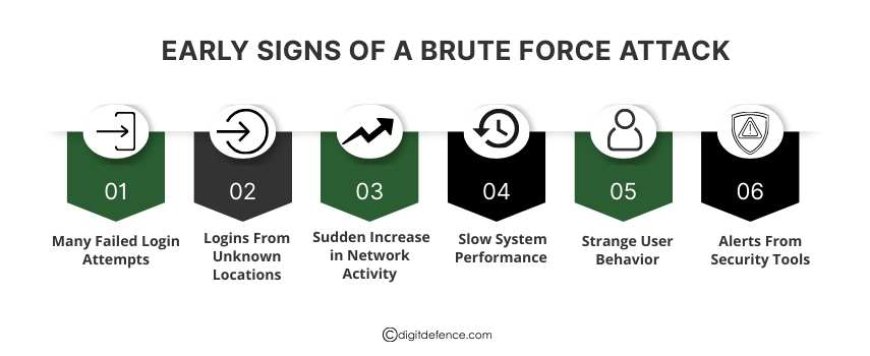
Detecting a brute force attack in cryptography early is very important. The sooner you notice it, the faster you can act to protect your system and data. Here are the common signs to watch for:
1. Many Failed Login Attempts.
Attackers use automated tools to try thousands of password combinations quickly. Even if it looks like small failed attempts at first, a series of failures within minutes or hours can be a serious warning. Monitoring login failures closely can help you detect a brute force attack in cryptography before it succeeds.
2. Logins From Unknown Locations
Another warning sign is login attempts from locations where your team or users normally don’t work. For example, if your employees are in one country, but the system shows attempts from another country, it is suspicious.
3. Sudden Increase in Network Activity
Your system may suddenly process a very high number of requests in a short time. This can affect system performance and may trigger alerts in monitoring tools. Regular monitoring of traffic patterns helps spot unusual spikes early and prevent bigger damage.
4. Slow System Performance
If your system slows down, freezes, or responds slowly, it might be under attack. During a brute force attempt, automated tools send multiple login requests rapidly, which can overload the system.
Even if your system is normally fast, sudden lag or crashes can indicate an attack. Paying attention to system performance, especially during unusual times, helps you catch attacks early.
5. Strange User Behavior
Sometimes, the attack may not show directly through login attempts but through unusual user behavior. Examples include:
-
New files are suddenly appearing on servers
-
Password change requests that were not initiated by users
-
Unusual admin activity, such as accessing sections of the system they normally don’t use
These small signs often appear before a full-blown attack. If ignored, attackers may gain access and cause serious damage. Detecting these behaviors early is critical to stopping a brute force attack in cryptography before it compromises sensitive data.
6. Alerts From Security Tools
Many modern security tools can detect unusual patterns. If your SIEM, firewall, or monitoring system shows repeated warnings about failed logins, high traffic, or suspicious IP addresses, it may indicate a brute force attempt.
Early alerts help your team respond quickly, lock accounts, and prevent unauthorized access.
How to Detect a Brute Force Attack Early
Detecting a brute force attack in cryptography early is very important. The sooner you notice it, the faster you can stop it before any damage occurs. Here are effective ways to detect attacks early and protect your system.
1. Monitor Login Activity
Regularly checking login logs is one of the simplest ways to detect attacks. Look for:
-
Multiple failed logins from the same account or IP
-
Logins at unusual times, such as late at night or early morning
-
Attempts with different passwords for the same account
Even a small number of repeated failed attempts can indicate an early attack. Monitoring login activity helps detect a brute force attack in cryptography before attackers succeed.
2. Enable Rate Limiting
Rate limiting restricts the number of login attempts allowed in a short period. For example, if someone tries more than 5 times in a few minutes, the system can temporarily block further attempts.
This slows down automated attacks and gives your security team time to respond. Rate limiting is an easy and effective way to make brute force attacks less successful.
3. Account Lockouts
Account lockout is a simple but powerful tool. If a user enters the wrong password repeatedly, the system locks the account for a short period.
This prevents attackers from trying thousands of passwords quickly. You can also set alerts for these lockouts to notify your security team when suspicious activity occurs.
4. Track Suspicious IP Addresses
Monitoring the IP addresses that access your system is very important. If login attempts come from unusual or unknown IPs, investigate immediately.
Attackers often use VPNs or proxy servers to hide their location. Identifying suspicious IPs early can help you block attackers before they gain access.
5. Multi-Factor Authentication (MFA)
MFA adds an extra layer of security. Even if an attacker guesses the password, they cannot log in without the second verification step.
Examples of MFA include:
-
Codes sent via SMS or email
-
Authentication apps that generate one-time codes
-
Hardware security keys
Using MFA makes a brute force attack in cryptography much harder to succeed.
6. Check Network Traffic
Monitoring network traffic can help detect unusual activity. A brute force attack generates a high volume of requests in a short time.
If your system suddenly receives many login requests or repeated connection attempts, it may be under attack. Early detection through traffic monitoring allows you to respond quickly and block malicious activity.
7. Strong Password Hashing
Passwords should always be stored using strong hashing algorithms. Hashing converts passwords into secure codes that are hard to guess.
Even if an attacker tries millions of combinations, breaking hashed passwords takes a very long time. Strong password hashing adds an extra layer of protection against brute force attacks and keeps user accounts safe.
Tools to Help Detect Brute Force Attacks
Several tools can help detect attacks early:
-
Security Information and Event Management (SIEM) tools – Track and alert to unusual behavior
-
Intrusion Detection Systems (IDS) – Monitor for attacks on the network or system
-
AI-based monitoring tools – Identify suspicious login patterns automatically
-
Firewall logs – Check for repeated access attempts
These tools help businesses respond quickly before attackers succeed.
Best Practices to Prevent Brute Force Attacks
1. Use Strong Passwords
Include uppercase, lowercase, numbers, and symbols. Avoid simple passwords like “12345” or “password.”
2. Change Passwords Regularly
Frequent password changes reduce the risk of attackers guessing old passwords.
3. Enable Multi-Factor Authentication
Add an extra layer of security to prevent unauthorized access.
4. Keep Systems Updated
Regular updates patch vulnerabilities that attackers might exploit.
5. Monitor and Log Activities
Keep track of failed login attempts, unusual logins, and network activity.
6. Educate Your Team
Train employees to use strong passwords and report unusual system behavior.
7. Use AI Security Tools
AI tools can detect patterns of attacks quickly and help prevent a brute-force attack in cryptography.
Why Early Detection Is Important
Detecting a brute force attack early helps you:
-
Stop attacks before damage occurs
-
Protect sensitive data
-
Maintain customer trust
-
Keep systems running smoothly
-
Reduce financial and reputational loss
The earlier you act, the safer your business will be.
A brute force attack in cryptography is a simple but dangerous method used by attackers to guess passwords or encryption keys.
Early detection is the key to protecting your system. Monitoring login activity, using rate limits, tracking suspicious IPs, enabling multi-factor authentication, and educating your team are essential steps.
By implementing these measures, businesses can secure sensitive data, maintain smooth operations, and reduce the risk of costly attacks. Remember, prevention and early detection are always better than repairing the damage later.