What Should I Do to Protect My Cloud?
Learn how to protect your cloud using strong security, backups, encryption, and access control to keep your data safe and prevent any breaches.
Cloud computing is part of almost every business today. It helps store files, run apps, and collaborate online. The cloud is fast, flexible, and cost-effective, but also comes with risks to your data, business, and customers.
Businesses face issues like hackers stealing data, account hijacks, malware, and misconfigured settings. Downtime and too many users with access can cause headaches, leading to financial loss, fines, and stress.
Cloud security keeps your data and apps safe. Even with a secure provider, you must manage access and protect information. It prevents data loss, ensures smooth operations, and builds customer trust.
In 2019, Capital One, a big bank in the U.S., had a serious cloud security breach. Hackers got access to the personal data of over 100 million customers, including names, addresses, credit scores, and social security numbers.
The breach happened because of a misconfigured firewall and too many permissions in their cloud system. A former employee took advantage of these mistakes to access sensitive data.
This case shows that cloud security is everyone’s responsibility. Businesses must manage access carefully, watch for unusual activity, and protect sensitive data, even when using trusted cloud services.
Why Cloud Security Is Important
Cloud security is important because it keeps your business data, applications, and customer information safe while using the cloud. Even if your cloud provider has strong security, your business is still responsible for protecting its data and controlling who can access it.
Key Points:
-
Protects sensitive data: Ensures customer information, financial records, and business files stay safe from hackers.
-
Prevents account hijacking: Reduces the risk of attackers taking over cloud accounts and misusing your data.
-
Stops malware and ransomware: Helps prevent viruses or malicious software from spreading in your cloud environment.
-
Maintains business operations: Prevents downtime caused by attacks or cloud service interruptions.
-
Ensures compliance: Meets laws and regulations like GDPR or HIPAA to avoid fines and penalties
Steps to Protect Your Cloud
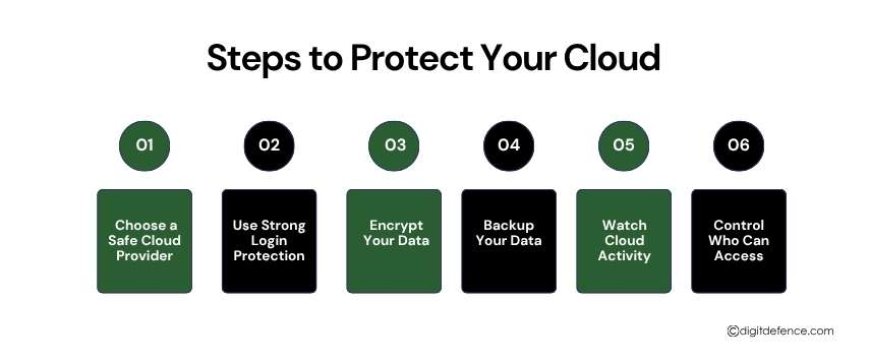
1. Choose a Safe Cloud Provider
Pick a cloud provider that has strong security, regular updates, and follows rules. Even with a good provider, you still need to protect your own data.
2. Use Strong Login Protection
Use multi-factor authentication and long, unique passwords. Give admin access only to people who really need it.
3. Encrypt Your Data
Make your data unreadable to others by encrypting files in the cloud while sending them. Keep your encryption keys safe.
4. Backup Your Data
Make automatic backups and store them in more than one place. Check that you can restore data quickly if needed.
5. Watch Cloud Activity
Turn on logs and alerts to see who is doing what. Check regularly for unusual activity to catch problems early.
6. Control Who Can Access
Give access based on job roles and only the access they need. Remove access for people who no longer need it.
How to Choose a Safe Cloud Provider
Choosing the right cloud provider is the first step to keeping your business data safe. Not all cloud providers offer the same level of security, so it’s important to make an informed choice.
1. Strong Security Practices
Look for a provider that uses advanced security measures, including firewalls, encryption, and intrusion detection. They should actively monitor their systems to prevent unauthorized access. A provider with strong security practices gives your business a safer environment to store and process data.
2. Regular Updates and Patches
Security threats are constantly changing, so a cloud provider updates their systems regularly and fixes vulnerabilities quickly. Providers who delay updates put your data at risk. Ask about their update schedules and how they handle security patches.
3. Compliance and Certifications
Check if the provider follows industry standards and regulations. Certifications like ISO 27001, SOC 2, HIPAA, or GDPR compliance show that the provider meets recognized security and privacy requirements.
4. Reliability and Performance
A secure cloud provider should also be reliable and stable. Check their uptime records and customer reviews to see if they provide consistent service. Frequent downtime or slow performance can affect your business operations and productivity.
5. Shared Responsibility Understanding
Even with a trusted provider, your business is responsible for protecting its own data. Make sure the provider clearly defines what they secure and what you need to manage. Understanding this “shared responsibility” model is crucial for effective cloud security.
6. Support and Response
Cloud providers offer fast and effective support. If something goes wrong, you want a provider that responds quickly and helps resolve security issues. Check their support channels, response times, and customer feedback.
Strong Login and Access Protection
Protecting your cloud accounts starts with strong login and access controls. Weak passwords or poorly managed access can make it easy for hackers to steal your data or disrupt your systems.
1. Use Strong, Unique Passwords
Always use long, unique passwords for each cloud account. Avoid simple or repeated passwords that are easy to guess. Consider using a password manager to store and generate secure passwords.
2. Enable Multi-Factor Authentication (MFA)
MFA adds an extra layer of security. Even if a hacker gets your password, they cannot access your account without the second verification step, such as a code sent to your phone or an authentication app.
3. Limit Administrative Access
Give admin or high-level access only to employees who truly need it. Too many users with high-level permissions can increase the risk of accidental changes or misuse.
4. Use Role-Based Access Control (RBAC)
Assign access based on job roles. Employees should only see and use the tools they need to do their work. This reduces the chances of mistakes or unauthorized actions.
Future Trends in Cloud Security
Cloud security is always changing. As more businesses use the cloud, it’s important to stay ahead of new threats and tools. Here are some trends for the future:
1. Zero-Trust Security
Zero-trust means never assuming anyone is safe. Every user and device must be checked before getting access. This helps stop unauthorized access.
2. AI and Smart Tools
AI can watch cloud activity all the time and spot unusual behavior fast. This helps stop attacks before they do damage.
3. Better Access Control
New tools will make it easier to control who can access what. Multi-factor authentication and smart access rules will become standard.
4. Stronger Encryption
Encryption will improve to keep data safe when stored or sent. New methods can even let people use data without seeing it.
5. Automation for Security
Automation can do security tasks automatically, like updates, monitoring, and alerts. This makes security faster and reduces mistakes.
6. Easier Compliance
Cloud tools will help businesses follow rules like GDPR or HIPAA. This reduces the chance of fines or legal problems.
Cloud computing offers speed, flexibility, and cost savings, but it also brings risks. By understanding common threats, identifying frustrations, and implementing strong security measures, businesses can protect their data, maintain compliance, and keep operations running smoothly.
Cloud security is not optional. It is essential for protecting your business, maintaining customer trust, and ensuring long-term success.