Top Ways to Defend Your Website Against Web Hacking
Is your website vulnerable? Learn top strategies to defend your website against web hacking and secure your digital presence today!

As a cybersecurity specialist, I've seen the change in web hacking techniques, and it’s becoming increasingly advanced. When I first started in the industry, many businesses had a false sense of security, thinking that cybercriminals only targeted large organizations. However, I’ve watched directly as small and medium-sized businesses fall victim to hacking attacks due to overlooked vulnerabilities. The aftermath of web hacking can be terrible, from losing customer data to destroying an organization’s reputation.
Over the years, I've worked with businesses of all sizes to strengthen their website defenses. In today’s digital environment, web hacking is a growing concern for anyone with an online presence. Cybercriminals are constantly looking for vulnerabilities to exploit, making it crucial for businesses to implement the right security measures. Here, I’ll share the top ways you can protect your website from hacking and keep your digital assets secure. Whether you are a website owner or a developer, these actionable steps will help strengthen your online presence and safeguard your data.
Understanding Web Hacking
Web hacking involves unauthorized access or manipulation of a website or web application by attackers. The primary goal of web hacking is to steal sensitive data, cause disruption, or damage a site’s credibility. Hackers use various methods such as SQL injection, cross-site scripting (XSS), and denial-of-service (DoS) attacks to infiltrate and compromise websites.
As more businesses move online, the hacking of websites becomes more lucrative for cybercriminals. According to recent statistics, nearly 30,000 websites are hacked every day, and the cost of cybercrime is projected to reach over 10 trillion annually by 2025. So, defending against the hacking of websites is no longer optional, it’s essential.
Top Ways to Defend Your Website Against Web Hacking
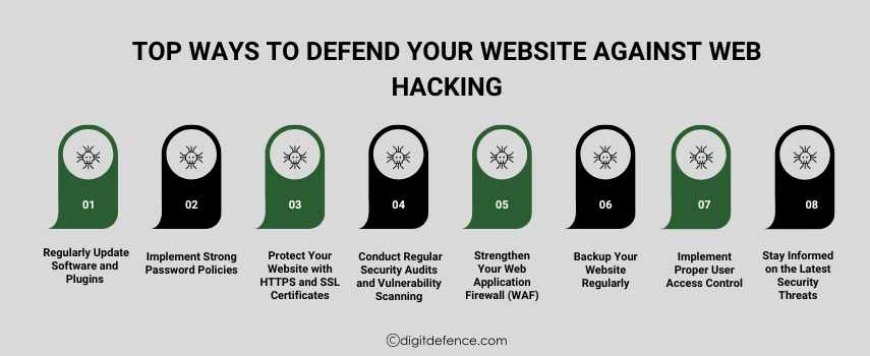
Now that we understand the risks associated with hacking websites, let’s dive into the best practices for defending your website and ensuring its security.
1. Regularly Update Software and Plugins
One of the most common vulnerabilities that lead to the hacking of websites is outdated software. Many website owners neglect the importance of keeping their content management systems (CMS), plugins, and themes up to date. Cybercriminals are quick to exploit known vulnerabilities in outdated software.
How to Protect Your Site:
-
Automatic Updates: Ensure that your CMS (e.g., WordPress, Joomla) is set to update automatically. If that’s not possible, make sure to regularly check for updates and install them.
-
Update Plugins and Themes: Regularly update any plugins or themes you are using. If any plugins or themes are no longer maintained or updated, replace them with newer, supported versions.
-
Use Trusted Plugins: Only use plugins and themes from reputable sources. Before installing any new plugin, check reviews and the plugin’s update history.
Regular software updates are critical in defending your site from being compromised through known vulnerabilities.
2. Implement Strong Password Policies
One of the simplest yet most effective defenses against hacking of websites is the use of strong passwords. Weak passwords are a hacker’s dream, as they can be easily cracked using brute-force attacks or guessed through social engineering. Web hacking often starts with compromised credentials.
How to Protect Your Site:
-
Enforce Strong Passwords: Implement a policy requiring users to create strong passwords, including a mix of letters, numbers, and special characters.
-
Use Multi-Factor Authentication (MFA): Enable MFA for all critical accounts, including admin and user logins. MFA adds a layer of security by requiring a second verification step (such as a code sent to your phone) before access is granted.
-
Password Managers: Encourage your team to use password managers to store and generate strong, unique passwords for each account.
By making password security a priority, you can significantly reduce the risk of unauthorized access to your website.
3. Protect Your Website with HTTPS and SSL Certificates
Ensuring that your website is served over HTTPS (Hypertext Transfer Protocol Secure) is one of the most important steps to protect your site from the hacking of websites. HTTPS encrypts the communication between your website and its users, protecting sensitive data such as login credentials and payment information from being intercepted by hackers.
How to Protect Your Site:
-
Install SSL Certificates: SSL certificates enable HTTPS on your website, ensuring that data transmitted between the user’s browser and your server is encrypted. Google now ranks HTTPS sites higher than HTTP, so it's also beneficial for SEO.
-
Force HTTPS Redirection: Once you install SSL, ensure that all HTTP traffic is redirected to the HTTPS version of your website so that all communication remains secure.
-
Monitor SSL Expiry: SSL certificates have an expiration date. Set up a reminder to renew your SSL certificate to prevent your website from losing its HTTPS status.
By implementing HTTPS, you’ll not only secure sensitive data but also build trust with your users.
4. Conduct Regular Security Audits and Vulnerability Scanning
Web hacking often exploits weaknesses that website owners aren’t aware of. Regular security audits and vulnerability scanning can help you identify these risks before hackers do. Proactive security checks are crucial in protecting your site against potential breaches.
How to Protect Your Site:
-
Use Security Tools: Use tools like Google Search Console, Sucuri, or WPScan to regularly scan for vulnerabilities and check for any malicious activity.
-
Penetration Testing: Perform penetration tests to simulate cyberattacks on your website and find vulnerabilities that need to be fixed.
-
Third-Party Audits: If you’re unsure about how to conduct a security audit, consider hiring an external cybersecurity firm to audit your website for vulnerabilities.
By regularly monitoring and testing your website’s security, you can stay one step ahead of potential attackers.
5. Strengthen Your Web Application Firewall (WAF)
A Web Application Firewall (WAF) is designed to protect your website by filtering out malicious traffic and preventing attacks like SQL injection, XSS, and other common hacking of websites techniques. A WAF sits between your website and the internet, analyzing incoming traffic for suspicious patterns and blocking potential threats.
How to Protect Your Site:
-
Install a WAF: Use a reputable WAF service like Cloudflare, Sucuri, or AWS WAF to monitor and filter traffic.
-
Configure Your WAF Properly: Customize your WAF settings based on the specific needs and risks associated with your website.
-
Regular Monitoring: Continuously monitor your WAF’s activity logs to identify any suspicious behavior and adjust rules accordingly.
By adding a WAF to your site, you can prevent many types of hacking or website attempts and stop malicious actors in their tracks.
6. Backup Your Website Regularly
In the event of a hacking or website attack, having recent backups of your website is essential for quick recovery. Backups can save you from losing critical data, and they allow you to restore your site to a previous, secure state.
How to Protect Your Site:
-
Automate Backups: Use tools like UpdraftPlus or BackupBuddy to schedule regular backups of your website.
-
Store Backups Securely: Keep your backups on an offsite location or cloud service (e.g., Google Drive, Dropbox) to prevent them from being compromised.
-
Test Your Backups: Regularly test your backups to ensure they can be restored without any issues.
With regular, secure backups, you can recover quickly from any hacking website attack or other technical failure.
7. Implement Proper User Access Control
Limiting access to your website’s backend is another important strategy to defend against hacking of websites. By controlling who can access sensitive areas of your site, you reduce the risk of unauthorized changes and data breaches.
How to Protect Your Site:
-
Assign Roles Carefully: Assign user roles based on necessity, limiting access to only those who need it.
-
Remove Inactive Users: Regularly audit user access and remove accounts that are no longer needed or are inactive.
-
Use Secure User Authentication: Ensure that users have strong, unique passwords, and implement MFA for admin accounts.
Implementing strict access control will reduce the chances of internal or external actors exploiting your website.
8. Stay Informed on the Latest Security Threats
Cybercriminals are constantly changing their methods, so staying informed about the latest hacking website techniques and vulnerabilities is crucial to keeping your website secure. As a website owner or developer, it’s important to keep up-to-date with new security threats and best practices.
How to Protect Your Site:
-
Subscribe to Security Newsletters: Stay updated by subscribing to newsletters like Securing Digital Life or OWASP to get alerts on new vulnerabilities.
-
Follow Security Blogs: Keep an eye on popular cybersecurity blogs like KrebsOnSecurity and Dark Reading to stay ahead of the curve.
-
Join Security Communities: Participate in online security forums or groups to share insights and learn from others in the industry.
By staying informed about the latest threats, you can anticipate and prevent emerging security risks.
Case Studies:
Case Study1:
Target is a major retail chain in the U.S., which experienced a massive data breach in 2013, compromising over 40 million customer records.
Challenge:
Hackers accessed Target's Point of Sale (POS) systems through a third-party vendor, stealing sensitive financial information from millions of customers.
Solution:
Target upgraded its POS systems, implemented multi-layered security measures, and enhanced vendor management and employee training on cybersecurity.
Case Study2:
Sony's PlayStation Network (PSN) suffered a massive data breach in 2011, exposing the personal information of 77 million users worldwide.
Challenge:
Hackers breached PSN and stole credit card details and personal information, leading to weeks of downtime and significant reputational damage.
Solution:
Sony rebuilt its infrastructure, strengthened multi-factor authentication, and implemented enhanced data encryption for user protection.
Web hacking is an ever-present threat, and website owners must take proactive measures to defend their sites. By implementing the best practices from regular software updates to advanced security configurations like WAFs and SSL certificates, you can significantly reduce your website’s vulnerability to hacking of website attacks.
Remember, web hacking doesn’t just happen to large companies, small and medium-sized businesses are also prime targets. By following these steps, you can protect your website, safeguard your data, and ensure a secure experience for your visitors. The key to preventing the hacking of websites is a holistic, ongoing approach to security that combines technology, awareness, and vigilance. Don’t wait until it’s too late, take action today and strengthen your website against web hacking.